“The best engineers aren’t the ones who know the most technologies. They’re the ones who know when not to use them.”
Why System Design Feels Intimidating
Open any System Design resource and you will see the same pattern: a question like ‘Design a URL Shortener’ quickly becomes a canvas filled with Kafka, Redis, API Gateways, Load Balancers, Kubernetes, CDNs, and half a dozen databases. It almost feels like the more components you draw, the more senior you appear.
But here’s what experienced engineers quietly understand: complexity is not a signal of quality. The ability to produce a dense architecture diagram filled with every fashionable technology is not what separates senior engineers from junior ones.
What separates them is a single habit: senior engineers start with the problem, not the technology. They reach for Kafka because they have identified a specific decoupling or durability problem – not because Kafka appears in every architecture diagram they have seen.
The fifteen mistakes in this post all trace back to the same root cause. Recognising that root cause is the most valuable thing you can take from this article.
The Core Difference in Mindset
Before we walk through each mistake, absorb this fundamental shift. Every mistake in this list is a symptom of the left-hand column. Every senior engineer’s instinct is an expression of the right.
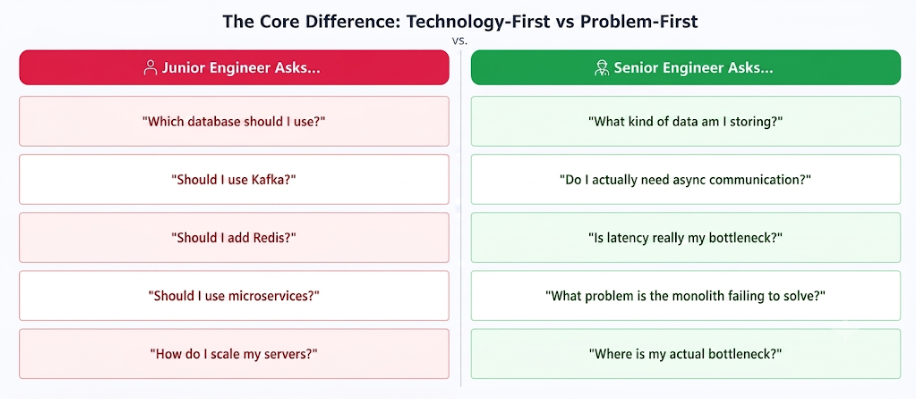
The technology often becomes obvious once the problem is clearly understood. The reverse – choosing technology and then finding problems for it to solve – is what produces every mistake in this list.
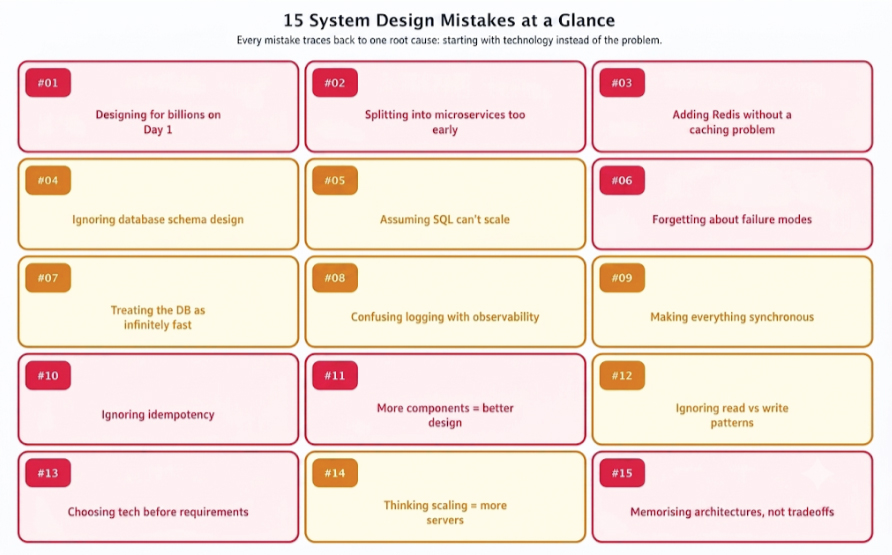
All 15 Mistakes at a Glance
Here is the complete map before we go deep on each. Notice how many of them cluster around the same theme.
MISTAKE
01
🔴 Critical
Designing for a Billion Users on Day One
This is arguably the most common and most expensive mistake in system design. You are building an internal leave management portal for a company of 500 employees. A junior engineer immediately proposes Kubernetes, Kafka, Redis, an API Gateway, twelve microservices, distributed caching, read replicas, and auto-scaling groups.
None of these solve a real problem the application currently has. The application does not need to handle millions of requests per second. It does not need geographic redundancy. It needs to let people apply for leave and have managers approve it.
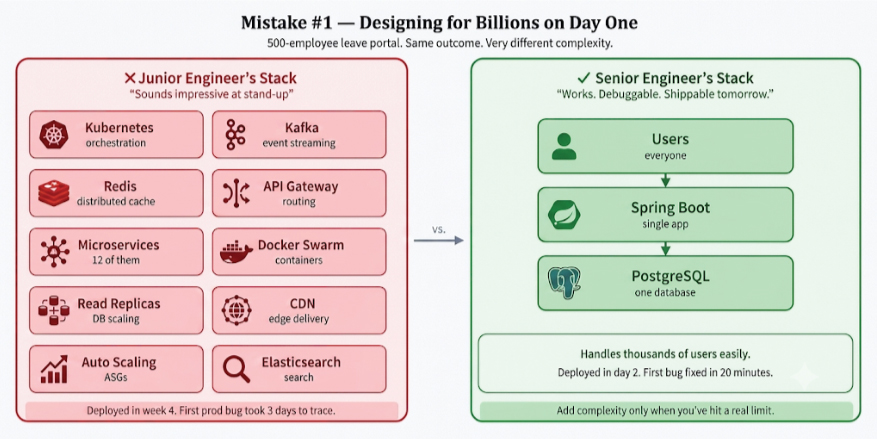
The over-engineered version takes months longer to build, is exponentially harder to debug, and costs a fortune in infrastructure. The proportionate version – a single Spring Boot app with a PostgreSQL database – ships in days, handles thousands of concurrent users comfortably, and can be debugged by a single developer without a distributed tracing setup.
Architecture should grow with the product. The right time to add Kubernetes is when you have outgrown simpler orchestration. The right time to add Kafka is when you have identified a specific async communication need. Not before.
Senior Engineer Asks: "What scale problem do I actually have right now?"
The Fix: Start with the simplest architecture that correctly solves today’s problem. Measure. Add complexity only at proven bottlenecks.
MISTAKE
02
🔴 Critical
Splitting Everything into Microservices
Microservices have become so synonymous with ‘modern backend’ that many engineers believe a monolith is a legacy system by definition. This is a dangerous myth, and it has caused a generation of teams to create unnecessary operational complexity.
Microservices introduce real costs: network latency between services, distributed transaction complexity, service discovery, versioning contracts, independent deployment pipelines, and a monitoring surface that multiplies with each service added. These costs are worth paying – when you have a problem that microservices solve.
The question to ask before splitting:
✗ ‘Should I use microservices?’ (technology-first)
✓ ‘What problem is my monolith failing to solve?’
– Is a specific team blocked waiting on another team’s deploys?
– Is one component consuming disproportionate resources?
– Do different parts of the system need radically different scaling?
If you can’t answer yes to at least one: keep the monolith.
If your application has four APIs and you split them into eight services, you haven’t made the system better. You’ve made a debugging problem into a distributed debugging problem. Martin Fowler’s ‘MonolithFirst’ pattern exists for precisely this reason: build a well-structured monolith, identify the seams that genuinely want to be separate services, then extract.
Senior Engineer Asks: "What specific problem is my monolith failing to solve today?"
The Fix: Start with a well-structured monolith. Extract services along proven seams – where different teams own different components, or where scaling needs genuinely diverge.
MISTAKE
03
🟡 Very Common
Adding Redis Without Knowing Why
Redis appears in almost every system design diagram. It is fast, battle-tested, and versatile. It is also one of the most reflexively added components in junior engineers’ designs – added not because a problem demands it, but because every diagram they have studied includes it.
Redis is fundamentally simple in purpose: store frequently accessed data in memory so you don’t have to recompute or re-fetch it from slower storage. If your application has very few reads, or constantly changing data that would invalidate the cache immediately, or simply doesn’t have a latency problem – Redis adds operational overhead without improving anything.
Rule of thumb: never add a cache until you have identified a caching problem.
The identifying process: measure your current database query times and API response times under realistic load. If they are acceptable, caching is premature optimisation. If specific queries are slow and frequently repeated – you have found your cache candidates.
There’s also the question of cache invalidation – one of the genuinely hard problems in computer science. Every cache you add is a potential source of stale data bugs. The complexity cost must be justified by a concrete latency or throughput benefit.
Senior Engineer Asks: "Where exactly is my application slow, and would caching that specific data help?"
The Fix: Profile first. Identify the slowest, most frequently repeated queries. Cache those specific results. Implement a clear invalidation strategy before the cache goes live.
MISTAKE
04
🟡 Very Common
Ignoring the Database Schema
Beginners spend enormous energy debating Kafka vs RabbitMQ, Redis vs Memcached, MongoDB vs Cassandra. They spend almost no time designing the database schema. This is backwards.
The database is where most production bottlenecks eventually appear. A poorly designed schema forces expensive multi-table joins on hot paths, stores duplicate data that falls out of sync, produces queries that can’t be efficiently indexed, and creates migrations so painful they consume entire engineering sprints.
-- ✗ Poorly designed: storing tags as a comma-separated string
CREATE TABLE posts (
    id      BIGINT PRIMARY KEY,
    title   VARCHAR(255),
    tags    VARCHAR(500)   -- 'java,spring,backend,microservices'
);
-- Can't index. Can't query efficiently. Nightmare to migrate.

-- ✓ Properly normalised: separate table with foreign key
CREATE TABLE post_tags (
    post_id BIGINT REFERENCES posts(id),
    tag     VARCHAR(100),
    PRIMARY KEY (post_id, tag)
);
-- Indexable. Queryable. Easy to extend.
Senior engineers spend more time designing tables than choosing frameworks. They think about access patterns, index strategies, normalization trade-offs, and migration paths before writing a single line of application code. The schema is the foundation – get it wrong and everything built on top is compromised.
Senior Engineer Asks: "What are my most frequent query patterns, and does my schema make those queries efficient?"
The Fix: Design your schema around your access patterns, not around your domain objects. Index early. Document the reasoning. Plan migrations before you need them.
MISTAKE
05
🟡 Very Common
Assuming SQL Doesn't Scale
Perhaps no myth is more persistent in system design than ‘relational databases don’t scale.’ Beginners routinely jump to MongoDB, Cassandra, or DynamoDB at the first sign of scale concerns, often introducing consistency problems and operational complexity that relational databases would have handled gracefully.
The reality: GitHub runs on MySQL. Shopify runs on MySQL. Instagram ran on PostgreSQL through its first years of hyper-growth. SQL scales far further than most applications will ever require, through indexing, read replicas, partitioning, sharding, query optimization, and connection pooling.
NoSQL databases solve specific problems: flexible schemas, extreme write throughput, document-oriented data, global distribution. If your data is naturally relational and your team knows SQL well – use SQL.
Switching to NoSQL to ‘solve scaling’ before you’ve exhausted SQL’s scaling options is premature optimisation of the most expensive kind.
The decision between SQL and NoSQL should be driven by data model and access pattern requirements – not by a vague assumption about which technology handles scale better. Most applications never reach the scale where that distinction becomes relevant.
Senior Engineer Asks: "What specific limitation of SQL am I trying to avoid - and have I actually hit that limit?"
The Fix: Default to SQL. Add proper indexes. Introduce read replicas when read load justifies it. Consider NoSQL only when you have a concrete requirement that SQL cannot meet.
MISTAKE
06
🔴 Critical
Designing Only for the Happy Path
Most system design diagrams look elegant and functional – as long as nothing fails. The database always responds. The network is always reliable. The third-party payment API is always available. Services always restart cleanly.
In real distributed systems, this assumption is dangerous. Failures are not edge cases – they are scheduled events. At any meaningful scale, some component is failing at any given moment. Servers crash. Network switches drop packets. Cloud providers have regional outages. Dependencies have degraded performance. The question is never whether your system will face failures – it’s what happens to users when it does.
Every component in your design deserves a failure question:
What happens if this is slow?
What happens if this is down?
What happens if this returns incorrect data?
What happens if this is unavailable for 5 minutes? 5 hours?
Tools for answering those questions:
Circuit Breakers → stop calling a failing service
Retries + Backoff → handle transient failures gracefully
Timeouts → don’t wait forever
Dead Letter Queues → catch and investigate failed messages
Health checks → detect failures before users do
Graceful degradation → lose one feature, not the whole app
Senior Engineer Asks: "What is the worst realistic failure in this system - and what is the user experience when it happens?"
The Fix: For every component in your design, explicitly answer: what fails, how is it detected, how does the system recover, and what does the user see during the failure?
MISTAKE
07
🟡 Very Common
Treating the Database as Infinitely Fast
A common implicit assumption in junior designs is that the database is essentially free – that you can query it as often as needed without consequence. In reality, databases are typically the first true bottleneck in a growing system.
Every unnecessary database query consumes CPU, memory, disk I/O, and connection pool slots. At low traffic levels this is invisible. At a moderate scale it manifests as increasing latency. At high scale it produces cascading failures as the database falls behind and queued requests pile up.
The most effective database optimisations, in rough order of impact:
1. Add indexes on columns used in WHERE, JOIN, and ORDER BY clauses
2. Cache frequently read, rarely changed data at the application layer
3. Batch writes to reduce individual INSERT/UPDATE volume
4. Use asynchronous processing for non-critical writes
5. Denormalize strategically – store computed data to avoid expensive joins on hot paths
Senior engineers are aggressive about keeping database traffic proportional to genuine need. They ask, for every query: does this need to happen synchronously? Can the result be cached? Can multiple operations be batched? Can this happen asynchronously?
Senior Engineer Asks: "Is this database query actually necessary right now, in this request?"
The Fix: Profile your database queries in production. Identify the top 10 slowest and most frequent. Apply indexing, caching, and batching in that order.
MISTAKE
08
🟡 Very Common
Confusing Logging with Observability
Almost every application has some logging. Very few have genuine observability. The difference becomes painfully apparent at 2 AM when a production alert fires and the on-call engineer has nothing but log files to debug a system with forty services.
Logging answers ‘what happened.’ Observability answers ‘why it happened, where, and how often.’ Full observability requires three pillars working together:
- Logs: Timestamped records of events. 'Payment failed for user 4821 at 14:32:07 - timeout from payment gateway.'
- Metrics: Numerical measurements over time. Error rate, P99 latency, throughput, memory usage, connection pool saturation.
- Distributed Traces: A trace follows one request through every service it touches, with timing at each hop. Instantly shows which service is responsible for latency.
Build observability from the start. Retrofitting it into a production system that is actively misbehaving is one of the most painful experiences in software engineering – doing it while being paged at 2 AM is worse.
Senior Engineer Asks: "If this system behaved unexpectedly in production right now, how long would it take me to identify the root cause?"
The Fix: Instrument every service with structured logs, expose Prometheus-compatible metrics, and implement distributed tracing (Jaeger, Zipkin) from day one. Set alerts on P99 latency and error rate, not just uptime.
MISTAKE
09
🔴 Critical
Making Everything Synchronous
A user places an order. A junior engineer’s first instinct is to handle everything in sequence before returning the HTTP response: validate the order, update inventory, charge the payment, send a confirmation email, generate a PDF invoice, notify the warehouse, publish an analytics event, update the recommendation engine.
The result: an API response that takes 2–4 seconds, a brittle flow where a slow email provider can time out the entire order, and a system where any downstream failure prevents the order from completing at all.
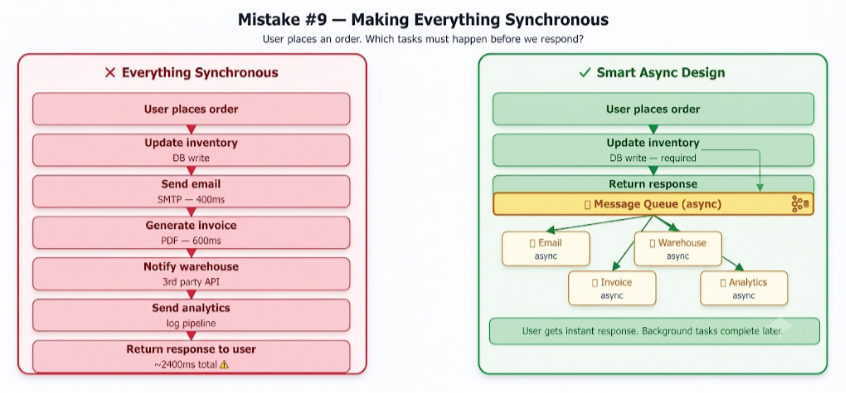
The key question to ask for every step in a workflow: does the user need this to complete before they get a response? Payment processing and inventory update: yes. Confirmation email, invoice generation, warehouse notification, analytics: no. Everything in the second category belongs in a message queue, to be processed asynchronously.
Async processing also provides natural fault tolerance: if the email service is down, the message stays in the queue and gets processed when the service recovers, without affecting the order flow at all.
Senior Engineer Asks: "Which of these steps actually needs to be completed before I return a response to the user?"
The Fix: Map every workflow step as either ‘required for response’ or ‘can happen later.’ Move the second category to a message queue. Monitor queue depth as an operational health signal.
MISTAKE
10
🔴 Critical
Ignoring Idempotency
Network calls fail. Clients retry. This is a fundamental truth of distributed systems, and it creates one of the most consequential bugs in payment, booking, and any state-modifying API: the double execution problem.
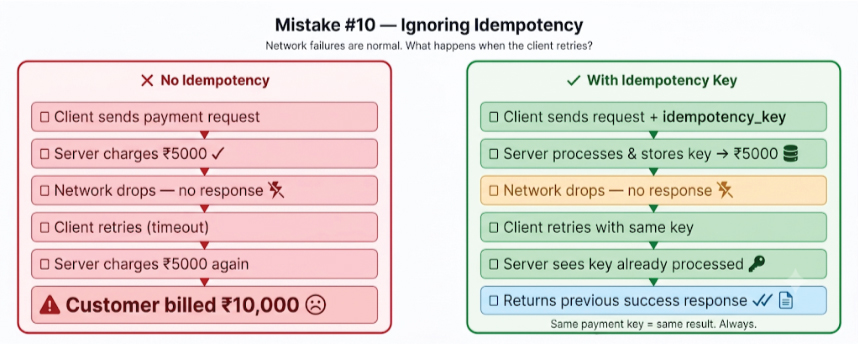
The scenario is simple: a client sends a payment request. The server processes it successfully. Before the response reaches the client, the network drops. The client has no confirmation, so it retries. Without idempotency controls, the server processes it again. The customer is billed twice.
// Idempotency key pattern - safe retries for any state-modifying API

POST /api/payments
Idempotency-Key: order-4821-attempt-1  ← client generates, stable across retries

// Server logic:
if (idempotencyStore.contains(key)) {
	return idempotencyStore.getCachedResult(key);  // return same result
}
Result result = processPayment(request);
idempotencyStore.store(key, result, TTL_24H);   	// cache for retry window
return result;

// Same key = same result, regardless of how many times it's sent.
Idempotency is not optional for payment APIs, booking systems, inventory updates, or any API that creates or modifies real-world state. Stripe’s API makes idempotency keys a first-class feature. Every state-modifying endpoint you build should do the same.
Senior Engineer Asks: "What happens if this request is processed exactly twice - and does my system handle that correctly?"
The Fix: Require an idempotency key for all state-modifying endpoints. Store processed keys with a TTL that covers your retry window. Return the cached result for duplicate requests.
MISTAKE
11
🔴 Critical
Thinking More Components = Better Design
There is an implicit assumption many engineers carry into system design: that a diagram with more boxes demonstrates deeper expertise. The opposite is frequently true.
Every component you add to a system increases its maintenance burden, deployment complexity, failure surface, and cognitive load. A load balancer is another thing to configure and monitor. A cache is another source of stale-data bugs. A message queue is another operational concern during incidents. These costs are worth paying – when the component solves a real problem.
The best architecture is typically the simplest one that correctly solves the problem in front of you.
In a code review or design review, removing a component that isn’t solving a real problem is often the most impactful contribution you can make.
Good architects are ruthless about complexity. They ask, for every component: what specific failure scenario or bottleneck does this address? If the answer is ‘nothing specific yet, but it might be useful’ – the component should wait.
Senior Engineer Asks: "What would break if I removed this component entirely?"
The Fix: Before adding any new component, name the specific problem it solves. If you can’t, don’t add it. The right time for each component is when you’ve proven you need it.
MISTAKE
12
🟡 Very Common
Ignoring Read vs Write Patterns
Two applications can both be described as ‘web apps with a database’ while having radically different access patterns – and therefore requiring completely different architectural approaches.
A social media feed application might have 95% reads and 5% writes. Caching, read replicas, and fan-out-on-write patterns are the primary levers. A banking application might have 60% writes requiring strong consistency and ACID guarantees – caching account balances would be actively dangerous.
Understanding your read/write ratio before making architectural decisions determines which tools and patterns are relevant. Add caching to a write-heavy system and it becomes a source of stale data bugs. Insist on strong consistency for a read-heavy social feed and you’ve constrained yourself unnecessarily.
Senior Engineer Asks: "What is the actual ratio of reads to writes, and which ones are time-critical?"
The Fix: Measure or estimate your read/write ratio before designing your data layer. Let that ratio drive decisions about caching, replication strategy, indexing, and consistency requirements.
MISTAKE
13
🔴 Critical
Choosing Technologies Before Understanding Requirements
This is the technology-first mistake in its purest form, and it manifests constantly in system design interviews:
Interviewer: Design Twitter.
Candidate:  We'll use Kafka for the event stream-
Interviewer: Why Kafka?
Candidate:  ...it's good for high-throughput messaging.
Interviewer: What specific throughput problem are we solving?
Candidate:  ...silence...
The problem is not that Kafka is a bad choice for Twitter – it might be excellent. The problem is that the candidate chose it before establishing what problems Twitter’s architecture needs to solve. The technology was the starting point instead of the conclusion.
Requirements first, always. For Twitter: How many tweets per second? What’s the read/write ratio? How stale can a feed be? What’s the SLA for direct messages vs timeline feeds? The answers to those questions make the right technology almost obvious. The technology should be the consequence of requirements, not the starting point.
Senior Engineer Asks: "What are the non-negotiable constraints of this system, and what are the acceptable trade-offs?"
The Fix: In any design session, spend the first third of the time on requirements: scale, latency targets, consistency needs, failure tolerance, budget. Technology choices in the remaining time will flow naturally.
MISTAKE
14
🟡 Very Common
Thinking Scaling = Adding More Servers
Adding more application servers is the first and easiest scaling lever. It is also the one that stops working first. Once your application servers are no longer the bottleneck, adding more of them has zero effect – and can actually make things worse by increasing load on the database or cache.
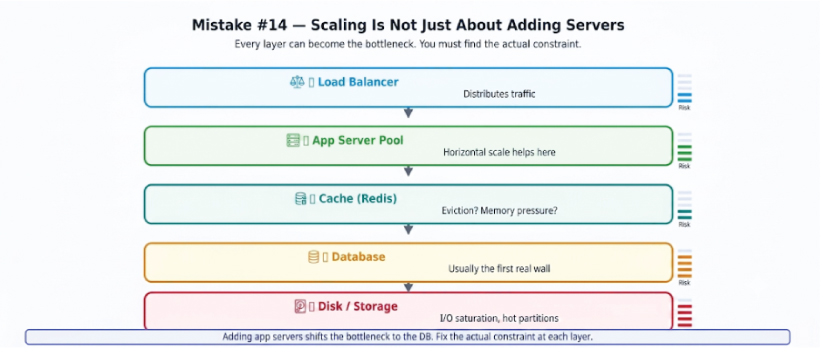
Scaling is about finding and eliminating the current bottleneck – whatever single constraint limits the system’s overall throughput. Application servers are usually the first bottleneck to hit and the easiest to resolve. After that, the bottleneck typically moves to the database, then to specific hot queries, then to cache memory limits, then to storage I/O.
The discipline of bottleneck analysis – measuring to identify the actual constraint before applying a fix – is the difference between scaling work that matters and scaling work that is theatre. Doubling your app server count when your database is the bottleneck is expensive theatre.
Senior Engineer Asks: "Where is the actual bottleneck right now - and have I measured to confirm that?"
The Fix: Profile under realistic load. Identify the single component with the highest saturation. Fix that specific constraint. Re-measure. Repeat.
MISTAKE
14
🔴 Critical
Memorising Architectures Instead of Understanding Trade-offs
Many engineers preparing for system design interviews take the same approach: memorise the URL Shortener design, memorise the Netflix design, memorise the WhatsApp design, memorise the Uber design. Then arrive at the interview and panic when asked to design something they haven’t memorised.
Memorised architectures are brittle. Understanding trade-offs is generalisable. A senior engineer who has never thought about a ride-sharing system can design a credible Uber architecture from first principles – because they understand the fundamental problems (geolocation at scale, dynamic pricing, matching supply and demand, handling driver/rider state), and they know which architectural patterns address each one.
When you encounter any new system design problem, ask these questions in order:
1. What kind of data does this system store, and what are its access patterns?
2. What are the scale requirements – reads, writes, storage, concurrent users?
3. What consistency requirements apply? Where is strong consistency required?
4. What failures must the system survive gracefully?
5. What are the latency targets for the most critical operations?
The right architecture emerges from honest answers to these questions – every time.
The engineers who design systems that survive and scale are not the ones with the largest collection of memorised diagrams. They are the ones who have deeply internalised why each architectural decision exists – the problem it solves, the trade-off it makes, the scenario where it would be wrong.
Senior Engineer Asks: "What are the non-negotiable constraints here, and what trade-offs am I making?"
The Fix: For every system you study, ask not just ‘what did they build’ but ‘what problem forced that decision’ and ‘what would they have to give up to make a different choice.’ That understanding transfers to any system.
The Pattern Across All 15 Mistakes
If you trace every mistake in this list back to its root, you will find the same cause: starting with technology rather than starting with the problem. Every mistake is a different expression of the same habit.
| Technology-First Thinking | Problem-First Thinking |
|---|---|
|
|
| Answers precede questions. Components accumulate. | Problems drive solutions. Every component earns its place. |
Shifting to problem-first thinking is not instantaneous. It requires practice, and it requires resisting the very strong pull of familiarity – the comfort of reaching for the tools you already know rather than interrogating the problem first.
But every hour you invest in that shift pays back compoundingly. Once the habit is established, you will find that system design becomes less about memorisation and more about reasoning – and reasoning scales to any system, any domain, any scale.
“Before adding any component, pause and ask: what problem does this solve? If you can answer that confidently, you are already thinking less like someone preparing for interviews and more like someone designing systems that survive production.”
Understand the problem. Choose the tool. Ship the system. 🚀