- Home /
- System Design /
- System Design for DevOps Engineers: A Practical Guide to Scalable Applications
System Design for DevOps Engineers: A Practical Guide to Scalable Applications
If you are a DevOps engineer, there is a good chance that you already know more about system design than you think.
You have probably configured a load balancer at some point. You have scaled an application from one replica to five. You have worked with Kubernetes, Docker, databases, Redis, DNS, networking, monitoring, or cloud infrastructure. You may have configured database replicas, worked with autoscaling, troubleshot latency, or spent hours trying to understand why an application becomes slow when traffic increases.
All of these things are part of system design.
The interesting part is that most DevOps engineers don’t initially learn them as “system design.” We learn them one problem at a time. Someone asks us to configure NGINX, so we learn NGINX. An application needs more capacity, so we learn scaling. A database is becoming slow, so we learn indexing or caching. A service needs to survive a failure, so we learn replication and high availability.
The technology comes first.
The reasoning often comes later.
And that is where system design becomes important.
System design is not simply memorizing architecture diagrams filled with boxes for load balancers, databases, caches, queues, and servers. It is learning to look at a problem, understand its requirements, predict where it will fail, and then decide where each component should live and what trade-offs that decision introduces. The real skill is not collecting components but being able to explain why a particular component is needed and what trade-offs it introduces.
So instead of starting with a definition, let’s start with something much more familiar to a DevOps engineer.
Let’s deploy an application.
It Starts with One Server
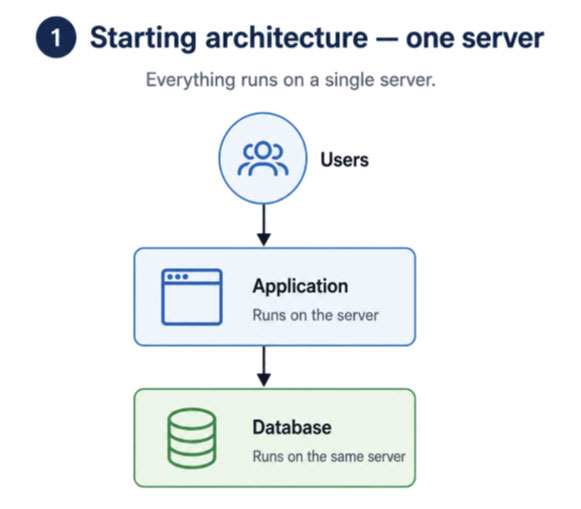
Imagine a developer comes to you with a simple photo-sharing application.
Users can create accounts, upload photos, follow other users, scroll through a feed, like photos, and comment on them.
The application works perfectly on the developer’s laptop.
Now it is time to deploy it.
You provision one server.
The application runs on that server. The database runs there too. The uploaded photos are stored there. Everything is in one place.
And honestly, there is nothing wrong with this architecture.
In fact, for a small application, it might be exactly the right architecture.
It is cheap. It is easy to deploy. It is easy to troubleshoot. If something breaks, you know exactly where to look.
This is something DevOps engineers sometimes forget when looking at architecture diagrams. We see large production systems with dozens of services and immediately assume that a small application should be built the same way.
It shouldn’t.
A system should start with its requirements.
Our little photo application has one server, and for a while, that server is perfectly happy.
Then someone posts the application on social media.
Traffic arrives.
10,000 users show up in a single day.
And suddenly our beautifully simple architecture isn’t so beautiful anymore.
The First Problem: The Server Is Running Out of Capacity
Every request consumes resources.
Users opening their feeds mean CPU work. Database queries consume CPU and memory. Photo processing consumes resources. Network traffic increases.
The server that was comfortably running at 20% CPU is now sitting at 80%, and the application that used to respond in 200 milliseconds is taking several seconds.
As a DevOps engineer, your first instinct might be familiar:
Scale it.
There are two obvious ways to do that.
You can make the existing server bigger.
More CPU.
More RAM.
Faster storage.
This is vertical scaling.
And there is nothing wrong with it.
If upgrading a machine solves the problem for another year without changing the application, that can be a very sensible decision.
But eventually you reach a limit. There is only so large one machine can become. And as machines get bigger, the cost doesn’t necessarily increase proportionally to the capacity you gain.
So we consider the other approach.
Instead of one big server, we run several servers.
This is horizontal scaling.
There is one more change we need to make before this architecture can work properly. We can’t simply duplicate the original server ten times, because each copy would also contain its own database. We need to separate the application tier from the database and make the database a shared dependency that all application servers can access.
Ten Servers Create a New Problem
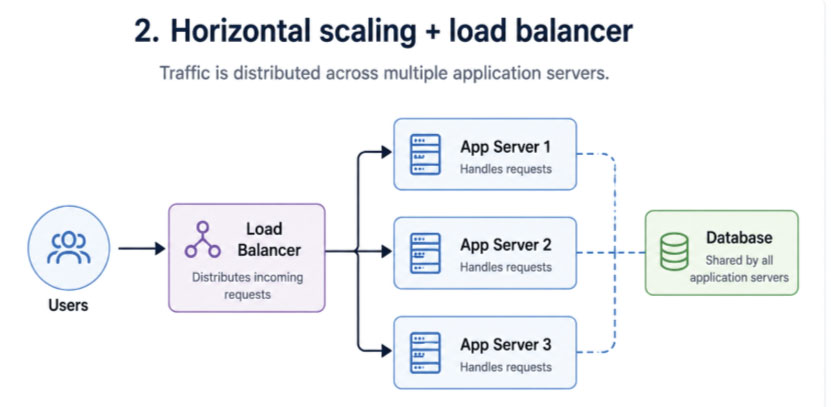
A user opens the application.
Which server should handle the request?
The user shouldn’t have to know that we have ten servers.
From the user’s perspective, there is still only one application.
So something has to stand in front of those ten servers and decide where each request should go.
That something is a load balancer.
If you have worked with NGINX, HAProxy, cloud load balancers, Kubernetes Services, or ingress infrastructure, this probably doesn’t sound new.
But look at it from a system-design perspective.
We didn’t add a load balancer because someone told us that every architecture diagram needs one.
We added it because we introduced multiple application servers and needed a way to distribute traffic between them.
The load balancer can distribute requests using strategies such as round-robin or least connections. More importantly, it can perform health checks and stop sending traffic to an unhealthy server.
And suddenly our architecture has evolved:
User → Load Balancer → Application Servers
But now ask yourself another question.
What happens if the load balancer itself fails?
We have just created another single point of failure.
That is the rhythm of system design.
You solve one problem.
The solution creates another problem.
You solve that problem.
The system becomes more resilient, but also more complicated.
Then Users Start Getting Logged Out
Our application is now running across multiple servers.
Everything looks good.
Except users are complaining.
They log in successfully, browse the application, click something, and suddenly they are asked to log in again.
Nothing changed in the login code.
So, what happened?
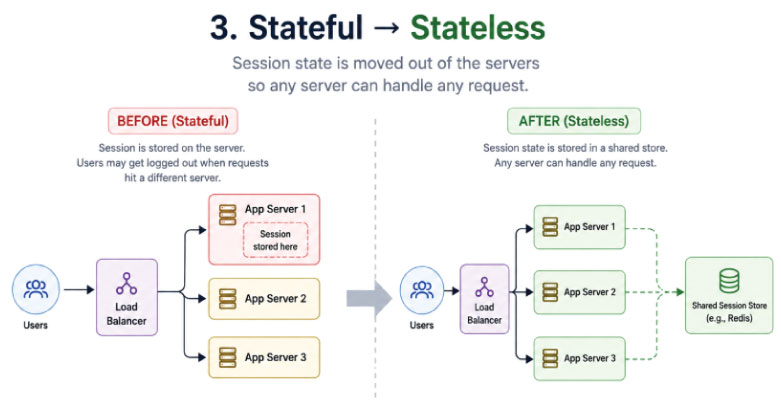
Imagine that a user logs in and their request reaches Server 1.
Server 1 stores the user’s login session in its own memory.
The next request from that user reaches Server 5 because the load balancer sends it somewhere else.
Server 5 looks at its memory.
It doesn’t know this user.
So, the user gets logged out.
This is one of those problems that makes perfect sense once you understand the architecture.
The application servers are stateful.
They are remembering information locally.
And once you start distributing requests across multiple servers, local memory becomes a problem.
The solution is to move important shared state outside the individual application servers.
A shared store can hold session information so that Server 1 and Server 5 can access the same data.
Now the application servers don’t need to remember users locally.
They can handle a request, return the response, and not depend on locally stored user state for the next request.
The servers become stateless.
This is one of the fundamental ideas behind scalable applications. If an application server disappears, no important user state should disappear with it. Storing application data does not automatically make an application stateful; the important question is whether the application server itself depends on state stored in its own memory or local disk.
And if you’ve worked with Kubernetes, this idea should immediately feel familiar.
A pod can disappear.
A new pod can appear.
Traffic can move between replicas.
That becomes much easier when application instances are disposable.
The infrastructure is changing underneath the application, but the user shouldn’t care.
Now the Database Becomes the Problem
Our application servers are scaling nicely.
We’ve scaled the application tier, but the database is still a single shared dependency.
Every application server is still talking to the same database.
And our application is a photo-sharing platform.
People browse their feeds far more often than they upload photos.
That means the application is read-heavy.
This is where system design starts asking questions that are more interesting than “Which database should I use?”
Before choosing a database, we need to understand what the application actually asks the database to do.
Show me a user’s profile.
Show me the photos uploaded by this user.
Show me my home feed.
Record a new photo.
Record a like.
Record a comment.
Show me the people this user follows.
These are called access patterns.
Once you understand the questions the application asks repeatedly, you can start designing the data model around them.
That is a much better starting point than asking, “Should I use PostgreSQL or MongoDB?”
For our photo application, much of the core data is structured and relational. Users connect to photos. Users connect to other users through follows. Likes and comments connect users to photos.
So a relational database such as PostgreSQL makes sense for the core application data.
Other data, such as flexible user preferences or high-volume behavioral information, can be handled differently.
The important lesson isn’t that SQL is always better than NoSQL.
The lesson is that technology should follow the workload and access patterns.
Understand the questions users will repeatedly ask first, design the shape of the data second, and choose the technology afterward.
That is system design thinking.
The Database Gets Slower
Our database now contains millions of rows.
A user asks:
“Show me all photos uploaded by this person.”
Without an appropriate index, the database may have to examine a huge amount of data to find the relevant rows.
So we add an index.
This is another concept most DevOps engineers may already have encountered while troubleshooting database performance.
But again, system design changes the question.
Instead of saying:
“Indexes make databases faster.”
we ask:
“Which queries are slow, and what index would actually help them?”
An index also has a cost.
Every time data changes, the index needs to be maintained.
So adding indexes everywhere isn’t automatically a good idea.
You identify the queries that matter, measure the problem, and then introduce an index where it provides value. On a table with millions of rows, the right index can dramatically improve the performance of a frequently used query.
Again, the pattern is the same.
Problem → decision → trade-off.
The application writes to the cache, and the cache synchronously writes to the database. Reads always hit the cache (no misses after the first write). The cache and database are kept in sync on every write.
Then Millions of Users Ask for the Same Thing
Now let’s imagine something even more extreme.
A hugely popular person uploads a photo.
Millions of users want to see it.
Without caching, the database might repeatedly answer essentially the same question:
“Give me this photo.”
Again.
And again.
And again.
And again.
Why should the database perform the same work millions of times?
So we introduce a cache.
The application can use something like Redis as a cache for frequently requested data.
The first request might be a cache miss. The application doesn’t find the data in Redis, so it retrieves it from the database, returns it to the user, and stores the result in the cache.
As a DevOps engineer, you may already know how to deploy Redis.
But system design asks the more interesting questions.
What should we cache?
How long should we cache it?
What happens when the data changes?
What happens when the cache goes down?
What happens when thousands of requests miss the cache at exactly the same time?
Popular photos and profiles are good examples of data that may be read frequently while changing relatively infrequently, making them strong candidates for caching.
And then comes one of the most important lessons in caching.
Caching creates a second copy of your data.
Now you have the database.
And you have the cache.
What happens when the database says one thing and the cache says another?
Suppose a user changes their profile information.
The database has the new value.
The cache still has the old value.
Your system is fast.
But it is wrong.
That is the trade-off.
Caching improves performance, but it introduces consistency problems.
You can use TTLs to allow cached values to expire. You can actively invalidate cached data when the underlying data changes. And you have to decide how much stale data the application can tolerate.
For a trending feed, a few seconds of stale data may be acceptable.
For security or privacy-related information, it may not be.
That decision is system design.
What Happens When the Database Dies?
There is another uncomfortable question.
What if our database goes down?
Our application servers are running.
Our load balancer is healthy.
Our cache is working.
But the database is gone.
The application still can’t function properly.
So, we introduce database replication.
Instead of having one database, we maintain multiple copies.
A primary database handles writes. Replicas can handle eligible read traffic. Now we can distribute read traffic, and with an appropriate failover mechanism, replicas can also contribute to high availability.
But once again, the solution introduces another problem.
The replicas may not have the latest data immediately.
The primary has the newest write.
The replica may receive it a little later.
That delay is replication lag.
And this is where consistency becomes an important system-design consideration.
Imagine a user uploads a photo. The write reaches the primary database. Half a second later, the user refreshes their profile. If the read happens to reach a replica that hasn’t received the latest change yet, the user might temporarily not see their own photo.
The data wasn’t lost. The replica simply hadn’t caught up.
This is one of the trade-offs associated with asynchronous replication and can result in temporarily stale reads. In systems where this behavior is acceptable, it can be part of an eventual-consistency model.
Replication lag and eventual consistency are related, but they are not the same thing.
Before Designing a System, Ask Five Questions
This is probably the most important habit a DevOps engineer can develop when learning system design.
Before drawing a single architecture diagram, ask:
How many users do we have, and how quickly are they growing?
A system serving 1,000 users is not the same system as one serving 50 million users.
Is the application read-heavy or write-heavy?
Our photo application is heavily read-oriented because users scroll through many photos but upload relatively few.
What data can we never lose?
A user’s uploaded photo may be extremely important.
A like count being temporarily inaccurate may be far less important.
How much latency can we tolerate?
A feed may need to feel almost instant.
A photo upload may be allowed to take several seconds.
What does the system cost?
Every server, replica, cache, and additional component costs money.
The best architecture isn’t necessarily the one with the most boxes.
It is the one that satisfies the requirements at an acceptable cost.
This is the part that separates someone who knows technologies from someone who can design systems.
Anyone can say:
“Add Redis.”
The better engineer says:
“The application is read-heavy, and these particular objects are requested constantly but change rarely. Therefore, caching them will reduce database load and improve latency.”
That second answer demonstrates reasoning.
And eventually, the Monolith Starts Feeling Too Large
Remember our original application?
It started as one codebase.
That was the right decision.
But the application has grown.
The feed is now extremely busy.
Photo uploads are relatively light.
Notifications are growing.
The team has grown too.
Now we have another architectural question.
Should everything remain in one application?
Or should we split parts of it into separate services?
This is where the monolith-versus-microservices discussion begins.
A monolith keeps everything together.
One codebase.
One deployment unit.
A relatively simple request path to troubleshoot.
For a small team and a small application, that simplicity can be extremely valuable.
Microservices split the application into separate services.
The feed can become its own service.
Photo uploads can become another.
Notifications can become another.
Now each service can be deployed and scaled independently.
Imagine the feed needs ten servers while the upload service needs only two.
With a monolith, you may have to scale the whole application.
With separate services, you can scale only the component that needs capacity.
That is a genuine reason to introduce microservices.
Not because microservices are fashionable.
Not because every architecture diagram on the internet has them.
Because the requirements justify them.
And there is a cost.
Services now communicate over a network.
Network calls can be slow.
They can time out.
They can fail halfway through an operation.
Debugging becomes harder because one user request may travel through several services.
That is why the right question isn’t:
“Monolith or microservices?”
The better question is:
“What problem are we trying to solve by splitting the application?”
A small application can benefit from the simplicity of a monolith, while microservices become useful when independent scaling or team boundaries create a real reason to split the system.
You Already Know Many of These Pieces
And this is where system design becomes particularly interesting for DevOps engineers.
Look back at everything we just did.
We started with one server.
Then we introduced horizontal scaling.
You probably know that.
We introduced a load balancer.
You probably know that too.
We made application servers stateless.
You’ve probably dealt with sessions, shared stores, containers, or Kubernetes workloads.
We introduced PostgreSQL.
You may already manage databases.
We introduced indexing.
You’ve probably troubleshot slow queries.
We introduced Redis.
You may have deployed or monitored it.
We introduced replicas and replication lag.
You’ve probably seen database high-availability architectures.
We discussed traffic routing and distributed application components.
You’ve probably worked with them.
We discussed microservices.
You’ve probably deployed them.
So, what’s missing?
The connection.
You know the individual components.
System design teaches you to look at the system as a whole.
From Knowing Tools to Understanding Why They Exist
This is perhaps the biggest shift a DevOps engineer can make.
Don’t look at a load balancer as just another component you configure.
Ask why the application needs one.
Don’t look at Kubernetes scaling as simply changing replicas from two to ten.
Ask what bottleneck you’re trying to remove.
Don’t look at Redis as simply a cache you deploy.
Ask which workload you’re protecting your database from.
Don’t look at database replication as a checkbox for high availability.
Ask what happens to reads, writes, consistency and replication lag.
Don’t look at microservices as the natural evolution of a monolith.
Ask what independent scaling, ownership or deployment problem they solve.
That is the difference between operating infrastructure and thinking about systems.
HLD vs LLD: Don’t Solve the Wrong Problem
There is another concept worth understanding when you start learning system design: high-level design and low-level design.
High-level design, or HLD, looks at the architecture from a distance.
Where does the request go?
Where is the data stored?
Where does caching happen?
How does the system scale?
What happens when a component fails?
Low-level design goes much deeper into the implementation of a particular feature, including classes, functions, objects and data structures.
If someone asks you to design Instagram at a system-design level, they are generally asking you to reason about the architecture.
If they ask you to design the like functionality or an in-memory cache, they may be asking you to go much deeper into the implementation.
The important skill is knowing which level you are solving at. Think of it as answering at the correct “altitude” instead of spending twenty minutes solving the wrong problem.
For a DevOps engineer, this distinction is especially useful.
You don’t necessarily need to become a software architect overnight.
But you should become comfortable looking at the big picture.
The Architecture Is Not the Point
If you take only one idea from this article, let it be this:
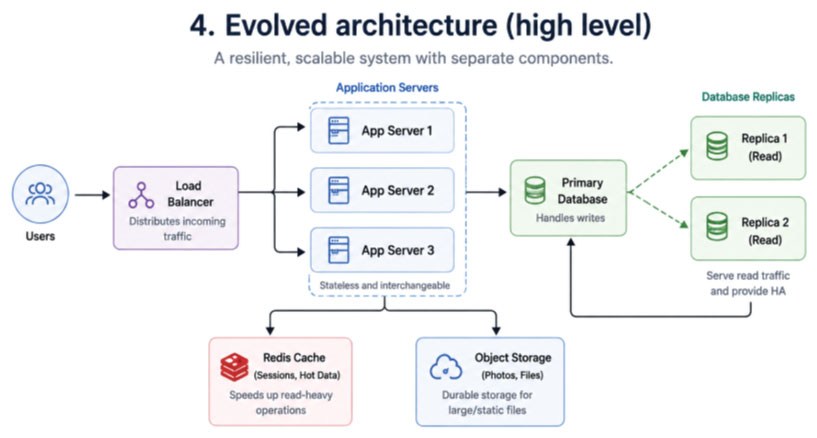
System design is not about drawing the biggest architecture diagram you can.
It is about understanding the problem well enough to know what belongs in the architecture and what doesn’t.
A small internal application might not need ten servers, multiple replicas, a distributed cache, a message queue and fifteen microservices.
Adding all of those components doesn’t make the architecture better.
It makes it more complicated.
The right design depends on the requirements.
Our photo application started with one server because one server was enough.
Then traffic forced us to scale.
Scaling forced us to introduce a load balancer.
Multiple servers exposed state-management problems.
The growing database introduced indexing and caching requirements.
The database became a reliability concern, leading to replication.
The growing application and different scaling requirements eventually gave us a reason to consider splitting services.
Every box in the architecture appeared because the previous architecture could no longer solve a particular problem.
That’s system design.
You Don’t Need to Learn System Design from Zero
If you’re already a DevOps engineer, don’t approach system design thinking that you have to start from scratch.
You already have pieces of the puzzle.
You know infrastructure.
You know networking.
You know containers.
You know cloud platforms.
You know Kubernetes.
You know monitoring.
You know CI/CD.
You know what happens when a server goes down at 2 AM.
What you need to develop is the habit of connecting those pieces.
The next time someone asks you to deploy an application, don’t stop at:
“Where should I run it?”
Start asking:
How many users will access it?
What happens when traffic increases?
What happens when one instance dies?
Is the application stateless?
What data needs to be shared?
What happens when the database becomes slow?
What can be cached?
What happens when the cache contains stale data?
What happens when the database fails?
Which components actually need to scale independently?
Those questions change the way you look at infrastructure.
And eventually, you stop seeing a collection of tools.
You start seeing a system.
From DevOps Engineer to Systems Thinker
The next level of DevOps isn’t necessarily learning another tool.
There will always be another tool.
Another Kubernetes feature.
Another cloud service.
Another observability platform.
Another deployment technology.
The more valuable skill is understanding why the architecture is designed the way it is.
Because once you understand the reasoning, the tools become easier to learn.
NGINX becomes a way to solve a traffic-management problem.
Redis becomes a way to solve a latency and database-load problem.
Kubernetes becomes a way to manage and scale workloads.
Database replication becomes a way to distribute read traffic and, with an appropriate failover mechanism, contribute to high availability.
Microservices become a way to independently deploy and scale parts of an application when the architecture and organization justify that separation.
And suddenly, system design doesn’t feel like a completely different subject.
It feels like the next layer of the DevOps knowledge you already have.
You already know many of the components.
Now it’s time to learn how to connect them.
And that is where you start moving from simply managing infrastructure to designing scalable systems.
If you’re a DevOps engineer looking to build that next level of architectural thinking through practical, hands-on learning, that’s exactly the kind of engineering mindset CodeKerdos is built around.