Introduction: That Small Feature With Big Engineering
When you hover your cursor over the timeline on platforms like Netflix, YouTube, or Prime Video, you instantly see different preview images showing what will play at that exact moment in the video.
It feels simple.
But behind this smooth experience lies a carefully designed process pipeline involving:
- Video processing systems
- Backend services
- Storage and CDNs
- Frontend rendering and caching
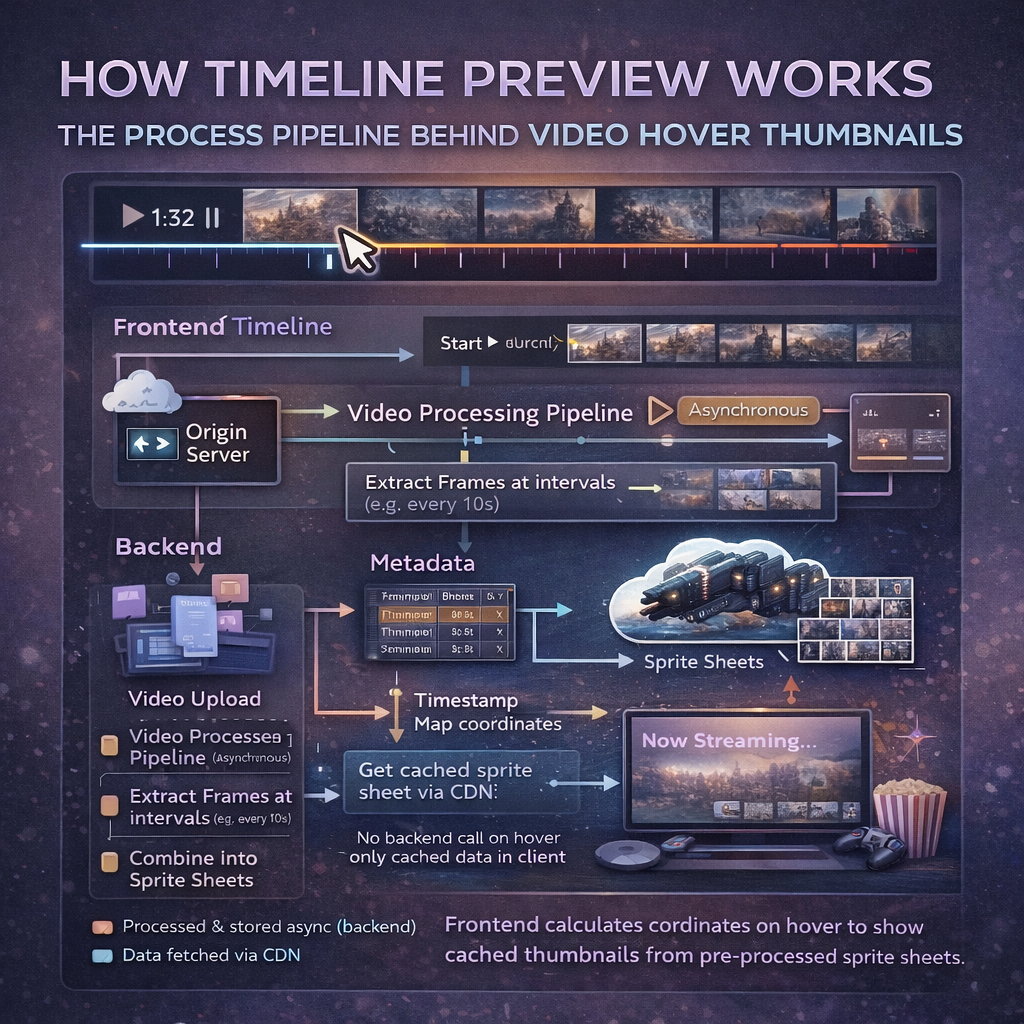
This blog explains, step by step, how timeline preview thumbnails work in real-world systems, from video upload to cursor hover.
The Core Problem Being Solved
Videos are long.
Users want:
- Fast seeking
- Visual context
- No buffering while scrubbing
Streaming the actual video on every hover is impossible.
So platforms solve this by pre‑generating image previews mapped to timestamps.
High-Level Architecture Overview
The system can be divided into four major stages:
- Video ingestion and processing
- Thumbnail generation pipeline
- Backend metadata & API layer
- Frontend timeline interaction
Each stage is optimized for performance, scale, and low latency.
Stage 1: Video Ingestion and Processing
When a video is uploaded to the platform:
- It is stored in raw format
- A processing pipeline is triggered
This pipeline runs asynchronously and performs:
- Video transcoding (multiple resolutions)
- Audio normalization
- Preview asset generation
This step is CPU‑intensive and handled by background workers.
Stage 2: Thumbnail Generation Pipeline
Instead of generating a thumbnail for every second, platforms:
- Extract frames at fixed intervals (for example, every 5 or 10 seconds)
- Balance accuracy with storage cost
How Thumbnails Are Created
- The video is decoded frame by frame
- Frames at specific timestamps are captured
- Images are resized and optimized
- Multiple thumbnails are stitched into sprite sheets
Sprite sheets reduce network requests and improve performance.
Stage 3: Metadata Mapping (Timestamp → Image)
For each video, the backend creates metadata that maps:
- Timeline position
- Timestamp in seconds
- Sprite sheet URL
- X, Y coordinates of the thumbnail
This metadata is stored in a database or configuration store.
Example (conceptual):
- Time 0–10s → Sprite A (x1, y1)
- Time 10–20s → Sprite A (x2, y1)
Stage 4: Storage and CDN Distribution
Preview assets are:
- Stored in object storage
- Distributed via a CDN
This ensures:
- Low latency worldwide
- No load on origin servers
- Fast image delivery during hover
This step is critical for smooth UX.
Backend API Design
When the frontend loads the video player:
- It requests preview metadata for the video
- The backend responds with:
- Sprite URLs
- Timestamp mapping data
This is a lightweight API call and happens once per video session.
Frontend Timeline Interaction Flow
Now comes the real-time part.
What Happens on Cursor Hover
- User moves cursor on the timeline
- Frontend calculates hover position
- Position is converted to timestamp
- Timestamp is mapped to thumbnail metadata
- Correct sprite image is selected
- CSS background-position shows the right preview
All of this happens without additional API calls.
Why This Feels Instant
The system is fast because:
- Images are pre-generated
- Metadata is pre-fetched
- CDN serves assets
- Frontend logic is lightweight
No backend call is made during hover.
Why Sprite Sheets Are Important
Without sprite sheets:
- Each hover would require a new image request
- Network overhead would increase
- UX would degrade
Sprite sheets allow:
- One image request
- Hundreds of previews
This is a classic performance optimization.
Scaling This Feature
At scale, platforms must handle:
- Millions of videos
- Billions of hover events
Key scaling strategies include:
- Asynchronous processing pipelines
- CDN-heavy architecture
- Cache-first frontend design
Failure Handling and Fallbacks
If preview assets fail to load:
- The system falls back to a static thumbnail
- Video playback remains unaffected
Preview failure should never block playback.
Why This Is a System Design Problem
This feature touches multiple systems:
- Media processing
- Backend APIs
- Storage and CDNs
- Frontend performance
Designing it correctly requires thinking beyond UI.
Key Takeaways
- Timeline previews are precomputed, not real-time video frames
- Backend prepares metadata and assets
- Frontend uses math + CSS to render previews instantly
- CDNs play a crucial role in performance
Final Thoughts
Small UI features often hide the most interesting engineering problems.
Timeline preview thumbnails are a great example of how backend pipelines and frontend performance engineering come together to create a seamless user experience.