- Home /
- System Design /
- What Happens When a Database Becomes Slow?
What Happens When a Database Becomes Slow?
- By Manaswini De • Software Engineer & Instructor at CodeKerdos
A database that is down gets fixed fast. A database that is merely slow quietly takes your whole system with it. Here is how that happens, and how to stop it.
Ask engineers what they fear most about their database, and most will say “it going down.” Ask the ones who have been on call for a few years, and many will give a different answer: “it getting slow.”
A database that is down is easy to reason about. Requests fail immediately, alerts fire, dashboards turn red, and everyone knows where to look. A database that is slow is far more treacherous. It still answers, health checks still pass, and nothing is technically broken. Yet latency climbs, threads pile up, retries multiply, and services that never touched the database start failing because they depend on services that do.
A dead dependency fails fast. A slow dependency fails everyone else.
In this post we will walk through exactly what happens, step by step, from the first slow query to a full outage. We will look at the math that explains why the collapse is so sudden, the common root causes, how to diagnose them under pressure, and the defensive patterns that keep one slow component from becoming an incident.
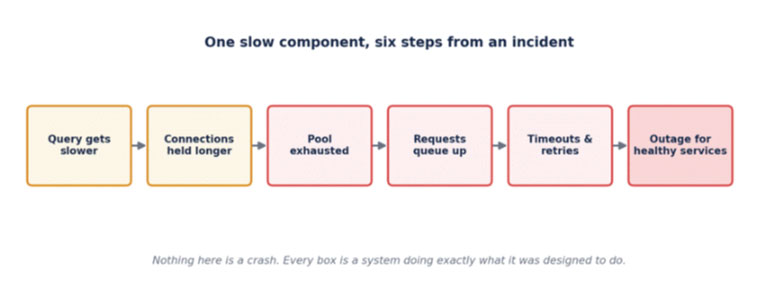
Figure 1: The cascade. Every step is a normal system behavior; together they produce an outage.
1. Slow Is Worse Than Down
When a dependency is completely unavailable, callers get a connection refused or a quick error. They can fail fast, trip a circuit breaker, or serve a fallback. The failure is loud and short.
When a dependency is slow, callers do something much more expensive: they wait. Each waiting request holds on to a thread, a connection, memory, and often a lock somewhere upstream. The longer the wait, the more resources are tied up, and the fewer are available for new work. Slowness is contagious because waiting is not free.
| Failure mode | What callers experience | Resource impact |
|---|---|---|
| Database down | Immediate errors | Low. Requests end quickly. |
| Database slow | Long waits, then timeouts | High. Threads and connections stay occupied. |
2. The Math: Why Latency Collapses Instead of Degrading
It is tempting to assume that if the database gets 10% busier, queries get roughly 10% slower. Queueing theory says otherwise. As utilization approaches 100%, the time a request spends waiting in line grows explosively, even though the actual work per query has not changed.
A simple model of a single-server queue gives an average response time of service_time divided by (1 minus utilization). With a 20 ms query, the numbers look like this:
utilization   average response time
    50%     	20 / (1 - 0.50) =  40 ms
    80%     	20 / (1 - 0.80) = 100 ms
    95%     	20 / (1 - 0.95) = 400 ms
Real databases are more complicated than a single queue, but the shape is the same: a long, flat stretch, then a sharp bend, then a wall. This is why systems can run happily for months at 70% utilization and fall over within minutes when traffic nudges them past 90%.
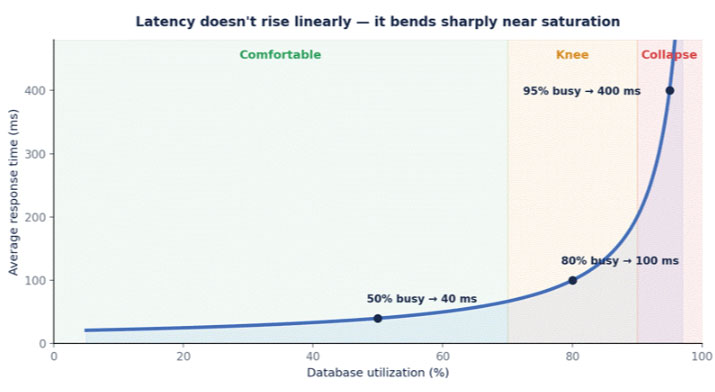
Figure 2: Response time versus utilization. The last 10% of capacity is where most outages live.
The practical lesson is to treat roughly 70 to 80% sustained utilization as the point where you should add capacity or reduce load, not as a target to run at. Headroom is not waste; it is what keeps you on the flat part of the curve.
3. Connection Pool Exhaustion: The First Domino
Most applications talk to the database through a connection pool, a fixed number of reusable connections. The pool protects the database from unlimited concurrency, but it also creates a hard ceiling that a slow database hits very quickly.
Little’s Law gives the relationship: the number of requests in flight equals throughput multiplied by latency. Suppose your service handles 500 requests per second and each query takes 20 ms. Then on average, 500 x 0.020 = 10 connections are busy. A pool of 20 is comfortable.
Now the database slows down and each query takes 400 ms. The same traffic needs 500 x 0.4 = 200 connections. Your pool of 20 saturates almost instantly, and everything else waits.
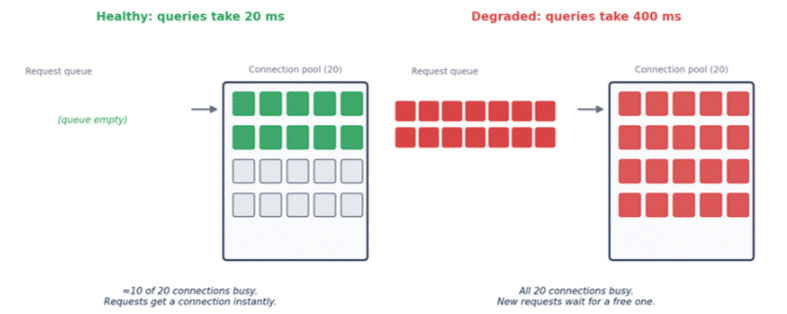
Figure 3: Same traffic, same pool, 20x slower queries. The pool saturates and a queue forms.
Notice what changed: not the traffic, not the code, only the query time. A 20x slowdown in the database became a complete stall in the application, because the pool turned slow queries into blocked requests.
A tempting but dangerous fix
When the pool is exhausted, the instinctive reaction is to raise the pool size. Sometimes that is right, but often it makes things worse. More connections mean more concurrent queries competing for the same CPU, memory, and disk on a database that is already struggling. You can turn a slow database into a thrashing one. Size pools deliberately, and remember that the total across all application instances is what the database actually sees.
4. Thread Pile-Up and Timeouts
While requests wait for a connection, the threads or workers serving them are blocked. A typical web server has a limited number of worker threads. Once they are all stuck waiting on the database, the server cannot accept new requests, including ones that do not need the database at all, such as health endpoints, static content, or cached responses.
This is where timeouts enter, and where they often go wrong. There are several different timeouts in a typical request path, and they must be consistent with each other:
- Connection acquisition timeout: how long a request will wait for a free connection from the pool.
- Query timeout: how long a single query may run before it is cancelled.
- Request timeout: how long the caller will wait for the whole operation.
- Client timeout: how long the user-facing client or upstream service waits for your response.
A common mistake is to leave one of them at “infinite” or a very large default. If your service waits 60 seconds for a query while its caller gives up after 5, then for 55 seconds your service is doing work nobody will ever read. A good rule is that timeouts should shrink as you go deeper: the database call should time out before the request does, and the request before the client does.
5. Retry Storms: Helping the Database Die Faster
Retries are a good tool for transient failures. Against a slow, overloaded database, they are poison. When requests start timing out, clients retry. Each retry adds load to a system that is already failing because of too much load.
Consider a service with three retries per request. When the database is healthy, retries almost never fire. When it slows down and 50% of requests time out, the effective traffic grows to roughly 2.5x or more. The database slows further, more requests time out, and the load climbs again. This positive feedback loop is called a retry storm, and it can keep a system down long after the original cause has gone away.
Defenses against retry storms include:
- Exponential backoff with jitter, so retries are spread out instead of synchronized.
- Retry budgets, which cap retries to a small percentage of total traffic.
- Retrying only idempotent operations and only on errors that are actually transient.
- Letting a circuit breaker stop retries entirely when failure rates are high.
6. How One Slow Query Becomes a Company-Wide Outage
In a microservice architecture the blast radius is larger. Imagine Service A Calls Service B, which queries a database that has just slowed down. Service B’s threads fill up waiting. Service A’s calls to B begin timing out, and Service A’s threads fill up too. Anything that depends on Service A is next. Meanwhile, Service A may also serve features that have nothing to do with that database, and those fail as well because the workers are gone.
This is a cascading failure: the original problem stays small, but the way systems wait on each other amplifies it. The distinguishing feature is that the database might be the least broken part of the picture by the time the incident peaks, because it is now being hit by retries and backed-up work from everywhere.
7. Why Does a Database Get Slow in the First Place?
Before you can fix a slow database, you need to know which kind of slow it is. Nearly all cases fall into four families.
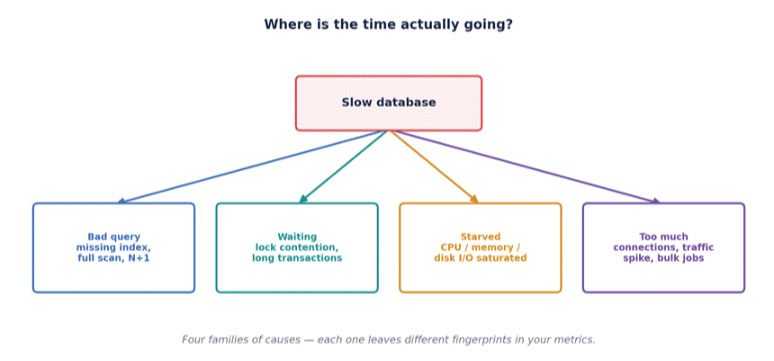
Figure 4: Four families of causes. Identifying the family narrows the search dramatically.
7.1 Bad queries
A missing index forces a full table scan. A query that was fine at 10,000 rows becomes painful at 10 million. N+1 patterns issue hundreds of small queries where one join would do. Queries without a LIMIT pull far more data than the page needs. Sometimes the query is fine, but the planner chooses a poor plan after statistics go stale or data distribution changes.
-- Look at what the database actually does, not what you hope it does
 EXPLAIN ANALYZE
 SELECT * FROM orders
 WHERE customer_id = 4812 AND status = 'PENDING'
 ORDER BY created_at DESC;

 -- Red flags in the plan:
 --   Seq Scan on a large table
 --   Rows estimated far from rows actual
 --   Sort spilling to disk
7.2 Waiting: locks and long transactions
Sometimes queries are fast when they run but spend most of their time waiting. A long-running transaction holding row locks blocks every writer touching the same rows. An idle-in-transaction session that forgot to commit can hold locks and prevent cleanup for hours. Schema changes that need strong locks can queue behind a long query and then block everything that queues behind them.
7.3 Starved resources
CPU saturation, memory pressure that evicts the working set from cache, and disk I/O limits all slow every query at once. A classic trigger is when the hot data no longer fits in memory: reads that were served from cache now go to disk, and latency jumps by an order of magnitude. Background work such as backups, vacuuming, compaction, or replication catch-up competes for the same resources.
7.4 Too much demand
A traffic spike, a new feature with an expensive query, a runaway batch job, or a deployment that doubles the number of application instances (and therefore connections) can all overload a database that was previously fine. Here nothing is wrong with the database itself; it is simply being asked to do more than it can.
| Family | Typical symptoms | First places to look |
|---|---|---|
| Bad queries | A few queries dominate total time; high rows scanned | Slow query log, EXPLAIN plans, missing indexes |
| Waiting | Low CPU, high latency, many sessions in a waiting state | Lock views, long-running transactions, blocked sessions |
| Starved resources | High CPU, high disk I/O, falling cache hit ratio | Host metrics, buffer cache stats, background jobs |
| Too much demand | Rising connection counts and QPS, everything uniformly slower | Traffic graphs, deployment history, batch schedules |
8. Diagnosing a Slow Database Under Pressure
During an incident you do not have time for a deep investigation. A disciplined sequence helps you move from symptom to cause quickly.
- Confirm where the time goes. Compare application-side query latency with database-side execution time. If the app sees 2 seconds but the database reports 20 ms, the delay is in the pool, network, or the app itself.
- Check what changed. Recent deployments, configuration changes, new feature flags, traffic shifts, and scheduled jobs explain a large share of incidents.
- Look at active sessions. Which queries are running right now, for how long, and what are they waiting on?
- Check for blocking. Find sessions that are blocked and the session blocking them. A single long transaction at the root is common.
- Check resources. CPU, memory, disk I/O, and cache hit ratio tell you whether the host itself is struggling.
- Inspect the slow query log and top queries by total time. The worst single query is often not the most expensive overall; a moderately slow query run thousands of times can dominate.
- Decide: fix, shed load, or fail over. Do not spend 30 minutes perfecting a diagnosis while users are down.
Percentiles matter here. Average latency hides the pain. If the average is 80 ms but p99 is 4 seconds, one request in a hundred is suffering, and for a page that makes ten queries, that is roughly one page load in ten.
9. Immediate Mitigation: Stop the Bleeding
The first goal during an incident is not elegance; it is to reduce load and restore headroom so the system can recover.
- Kill or cancel the runaway queries and long transactions that are holding locks or burning CPU.
- Pause or throttle batch jobs, reports, and backfills that compete with user traffic.
- Shed load: reject or defer low-priority requests so important ones can succeed.
- Turn off non-essential features that hit the database heavily, using feature flags.
- Roll back the most recent deployment if the timeline points to it.
- Temporarily serve cached or stale data for read-heavy endpoints.
- Scale up the database or add read replicas only if resource starvation is confirmed, and remember this can take time and sometimes adds load while it happens.
10. Building Systems That Survive a Slow Database
Incidents are inevitable. What matters is whether a slow database causes a degraded experience or a total outage. The following patterns work together, each limiting how far the damage can travel.
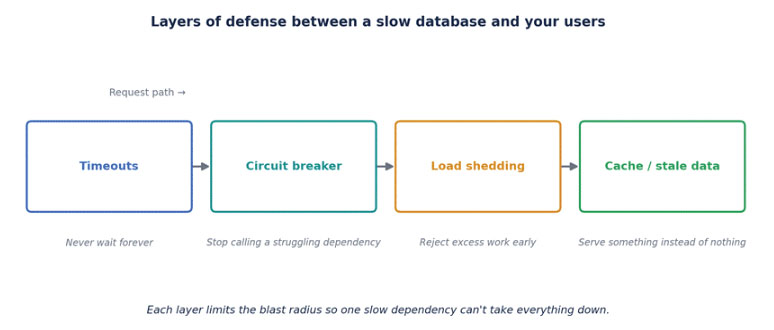
Figure 5: Layered defenses. Each layer catches what the previous one lets through.
Timeouts everywhere, and consistent ones
Every call to the database needs an explicit timeout, and the budgets should nest sensibly. Never rely on defaults, which are often unbounded.
client  timeout  = 5000 ms
 request timeout  = 4000 ms   (< client)
 query   timeout  = 2000 ms   (< request)
 pool wait timeout=  500 ms   (fail fast when saturated)
Circuit breakers
A circuit breaker watches error rates and latency to a dependency. When they cross a threshold, it “opens” and fails requests immediately for a short period instead of letting them queue up. After a cooldown it lets a few trial requests through to see if the dependency has recovered. This protects both your service and the struggling database from the pile-on.
Bulkheads and workload isolation
Borrowing from ship design, bulkheads separate resources so one failure cannot flood everything. Use separate connection pools for critical user paths and for background or reporting work, so a heavy report cannot starve checkout. Route analytical queries to a read replica rather than the primary.
Caching with a plan for staleness
A cache absorbs read load and keeps serving when the database is slow. The best setups can serve stale data deliberately during a database problem, trading a little freshness for availability. We covered the correctness side of this in our post on cache invalidation.
Load shedding and backpressure
When demand exceeds capacity, something has to give. It is better to reject some requests quickly and cleanly than to accept all of them and fail them all slowly. Prioritize by importance, return fast errors with a Retry-After hint, and let the system push back on callers rather than absorbing unbounded work.
Query hygiene and performance budgets
- Review query plans for new queries on large tables before they ship.
- Add indexes deliberately, understanding the write cost they carry.
- Paginate. Never return unbounded result sets.
- Avoid N+1 access patterns with joins or batched fetches.
- Keep transactions short. Do not hold a transaction open across network calls or user think-time.
- Test with production-sized data. Many slow queries only appear at scale.
11. What to Monitor Before It Hurts
The best incident is the one you saw coming. These signals tend to move first:
| Signal | Why it matters |
|---|---|
| p95 and p99 query latency | Tail latency rises long before averages do. |
| Connection pool usage and wait time | Rising wait time is the earliest sign of saturation. |
| Active vs. idle sessions, blocked sessions | Reveals lock contention and runaway queries. |
| Cache hit ratio | A falling ratio means more reads going to disk. |
| CPU, memory, disk I/O and queue depth | Shows whether the host is the bottleneck. |
| Replication lag | Signals the replica or primary cannot keep up. |
| Slow query log volume | A jump often points to a new or regressed query. |
Alert on trends and saturation, not just failures. An alert that fires when pool wait time crosses a threshold gives you minutes of warning that an alert on errors never will.
12. If You Are Asked This in an Interview
“What happens when your database becomes slow?” tests whether you think about systems rather than single components. A strong answer moves through these points:
- Slow is more dangerous than down because waiting consumes resources.
- Connection pool exhaustion and Little’s Law: latency times throughput gives in-flight work.
- Thread pile-up, and how it can take down endpoints that do not even use the database.
- Timeouts, and why they must be consistent across layers.
- Retry storms and how backoff, jitter, and retry budgets prevent them.
- Cascading failure across services.
- Root causes: queries, locks, resources, and demand, and how you would tell them apart.
- Mitigation: circuit breakers, bulkheads, caching, load shedding.
- Observability: tail latency, pool wait time, and saturation signals.
As with most reliability questions, the strongest answers describe what breaks first, what breaks next, and which design choice stops the chain.
The Bigger Lesson
A slow database is rarely a database problem alone. It is a test of everything built around it: how many connections you allow, how long you wait, how you retry, what you do when you cannot get an answer. The database simply applies the pressure; your architecture decides whether that pressure bends or breaks the system.
Resilience is not about preventing slowness. It is about deciding, in advance, what your system does when slowness arrives.
Final Takeaways
- A slow dependency is often more dangerous than a dead one because waiting holds resources.
- Latency is not linear in load. Keep headroom so you stay on the flat part of the curve.
- Little's Law explains pool exhaustion: in-flight requests = throughput x latency.
- Bigger pools are not automatically the answer; they can overload an already struggling database.
- Set explicit timeouts at every layer and make them shrink as you go deeper.
- Retries amplify load. Use backoff with jitter, retry budgets, and circuit breakers.
- Slow databases usually fall into four families: bad queries, waiting, starved resources, or too much demand.
- During an incident, reduce load first and perfect the diagnosis second.
- Isolate workloads with bulkheads so reports and batch jobs cannot starve user traffic.
- Watch tail latency and pool wait time; they warn you before errors do.
Ready to Take Your Tech Career to the Next Level?
Explore industry-focused courses at CodeKerdos and build the skills you need to excel in software engineering and system design.