How LLMs Learn to Use Tools and Act
codeKerdos.in | Gen-AI Blog Series
It’s 11:40 PM. Aditya is showing his manager the new AI assistant he built. “Ask it anything,” he says.
His manager types: “What were our total sales last week, and email the summary to the finance team.”
The assistant replies instantly. It writes a beautiful, confident paragraph about how sales might be trending, offers three tips for improving revenue, and closes with an encouraging note.
It does not know last week’s sales. It did not open the database. It certainly did not send any email. It just, talked.
His manager pauses. “So, it can describe what to do. But it cannot actually do it?”
That single question is the line that separates two very different things: a chatbot that talks about work, and an AI agent that actually does the work.
“How do I make the model stop describing the task and start completing it?”
That is the whole story of AI agents. Let’s tell it properly.
What is an AI agent, in one honest sentence
The cleanest definition in the industry, from Anthropic, is also the simplest:
The Core Idea
An AI agent is an LLM using tools in a loop to accomplish a goal.
Read that again, because every word earns its place:
- An LLM provides the reasoning, the "brain" that decides what to do.
- Using tools means it can reach outside its own text box: search the web, query a database, call an API, run code, send a message.
- In a loop means it does not answer once and stop. It acts, looks at the result, and decides the next step, again and again, until the goal is met.
- To accomplish a goal means you give it an outcome, not a script. How it gets there is up to the model.
A plain LLM answers a question. An agent completes a task. That difference, from answering to acting, is the entire leap.
Chatbot vs Agent: the difference that changes everything
Aditya’s assistant was a chatbot. Powerful, fluent, and completely sealed inside its own text box. Here is the contrast that makes it concrete:
| Feature | Plain LLM / Chatbot | AI Agent |
|---|---|---|
| What it does | Generates text | Takes actions in the real world |
| Knowledge | Frozen at training cutoff | Can fetch live data through tools |
| Steps | One shot: question in, answer out | Many steps in a loop until done |
| Control | You control every prompt | You give a goal; it decides the path |
| Example | “Here’s how you’d check sales…” | Actually queries the DB and emails finance |
A chatbot is a brilliant advisor who never leaves the room. An agent is a capable teammate who gets up, walks to the systems, and comes back with the job done.
Why plain LLMs hit a wall
To feel why agents exist, you have to feel the ceiling a raw LLM runs into.
A language model, on its own, can only do one thing: predict text. That is astonishing for explaining, drafting, and reasoning. But it means the model is trapped behind three hard limits:
- It is frozen in time. It knows nothing after its training cutoff. Ask about today’s sales, this week’s news, or a price that changed yesterday, and it can only guess.
- It cannot touch anything. It has no hands. It cannot run a query, hit an API, or send a message. It can describe the action perfectly and perform none of it.
- It answers once and stops. Real tasks are multi-step. “Book the cheapest flight and add it to my calendar” is not one prediction; it is a sequence of decisions that depend on what each step returns.
We have already met two ways of extending an LLM in this series. RAG gives the model fresh knowledge to read. MCP gives it a standard way to connect to tools. Agents are the layer that puts it all in motion: a model that reads, decides, acts, checks the result, and keeps going until the goal is done.
The heart of it all: the reason, act, observe loop
Every agent, no matter how fancy, runs on one simple cycle. It comes from a 2022 research pattern called ReAct (short for Reasoning + Acting), and it is the engine inside essentially every serious agent shipping today.
The loop has three beats that repeat:
The Agent Loop
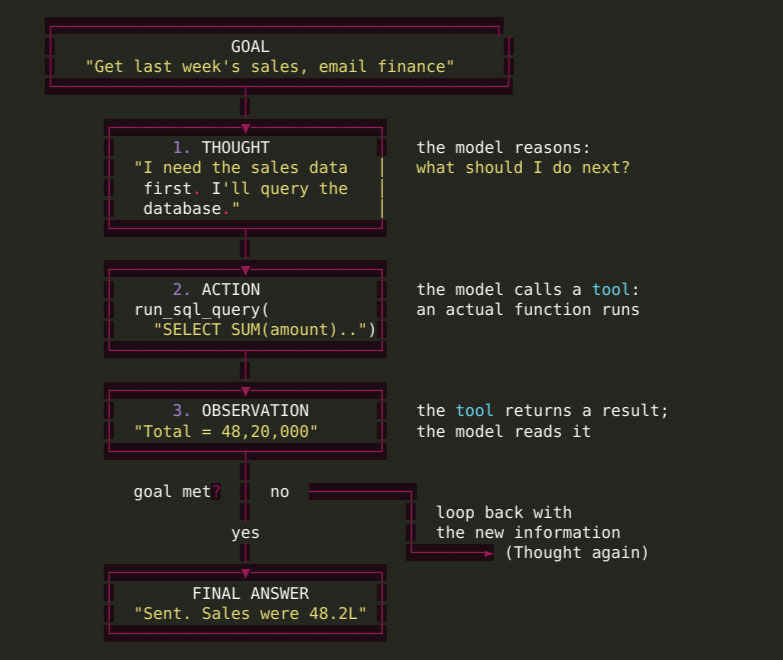
The magic is in why this works. Reasoning and acting reinforce each other. The model reasons about what to do, then the action’s result grounds its next thought. Instead of hallucinating a whole plan up front and hoping, the agent takes one grounded step at a time, adjusting as reality talks back. Each thought is anchored to the last observation. That is what makes agents robust instead of brittle.
A real ReAct trace, step by step
Let’s watch the loop actually run. The goal: “What is the weather in the city where our next event is being held?” Notice that the agent cannot answer in one shot, because it does not yet know the city. It has to work it out.
GOAL: Weather in the city of our next event?

Thought: I don't know which city yet. Let me look up the next event.
Action:       get_next_event()
Observation: { "event": "CodeKerdos Meetup", "city": "Pune", "date": "2026-07-20" }

Thought: The city is Pune. Now I need its weather.
Action:       get_weather("Pune")
Observation: { "temp_c": 27, "condition": "light rain" }

Thought: I now have everything I need to answer.
Final Answer: Your next event is in Pune on 20 July. It's currently
              27 degrees C with light rain, so plan for indoor seating.
Look at what happened. The agent chained two tools it was not told to use in a fixed order. It figured out the order itself, because each observation informed the next thought. No human wrote “first get the event, then get the weather.” The model reasoned its way there. That is the difference between a workflow (a fixed path you code) and an agent (a path the model discovers).
The anatomy of an agent: four parts
Peel open any agent and you find the same four components working together. Get these straight and you can reason about any agent system, however complex.
The Four Parts
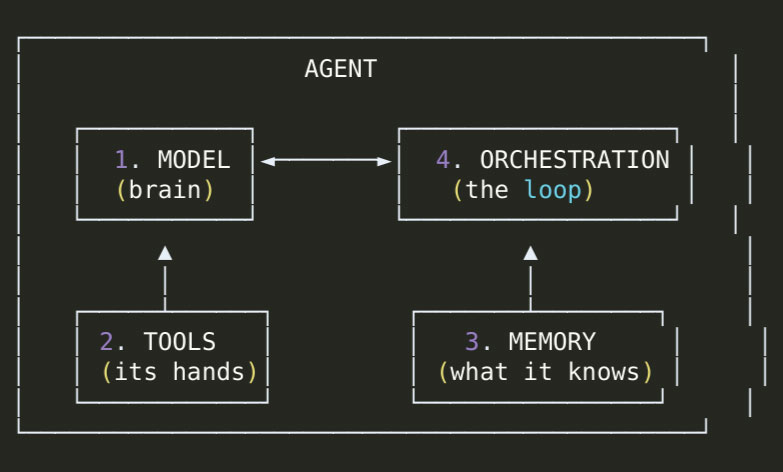
- The Model (the brain). The LLM that reasons and decides. It reads the current situation and produces the next thought and action. Its quality sets the ceiling on how well the agent plans.
- The Tools (the hands). The functions the agent can call: a database query, a web search, a calculator, an email sender, a code runner. Tools are how the model reaches beyond text. Each tool has a name, a description, and inputs. The description matters enormously, because the model reads it to decide when to use the tool. (This is exactly what MCP standardizes: a common way to expose tools to any agent.)
- The Memory (what it knows). Two kinds. Short-term memory is the running context of the current task: the thoughts, actions, and observations so far. Long-term memory is durable knowledge that survives across tasks: past conversations, user preferences, documents. Long-term memory is often powered by RAG and vector search.
- The Orchestration (the loop). The controller that runs the cycle: it feeds the model, executes the chosen tool, appends the observation, checks whether the goal is met, and decides whether to loop again or stop. This is also where the safety rails live: step limits, cost limits, and human approvals.
Show me the code: a minimal agent loop
Concepts click when you see them run. Here is the smallest honest agent loop in Python. It is deliberately simple, but it is genuinely the shape of a real agent.
# A minimal agent loop: reason, act, observe, repeat.

TOOLS = {
    "get_next_event": get_next_event,       # your real functions
    "get_weather": get_weather,
}

def run_agent(goal, max_steps=6):
    memory = [f"GOAL: {goal}"]             # short-term memory

    for step in range(max_steps):
        # 1. THINK: ask the model what to do next, given history so far
        decision = llm_decide(memory, tools=TOOLS.keys())

        # 2. If the model says it's done, return the answer
        if decision.type == "final":
            return decision.answer

        # 3. ACT: run the tool the model chose
        tool = TOOLS[decision.tool_name]
        result = tool(**decision.arguments)

        # 4. OBSERVE: write the result back into memory for the next loop
        memory.append(f"Action: {decision.tool_name}({decision.arguments})")
        memory.append(f"Observation: {result}")

    return "Stopped: reached step limit without finishing."
That is the entire idea. llm_decide asks the model, “given everything so far, what is the next thought and action?” The loop runs the tool, records the result, and asks again. Modern LLMs support this through tool calling (also called function calling): you hand the model a list of tools with their schemas, and instead of plain text it can return a structured request to call one of them. The loop executes it and feeds the result back.
Note: the step limit is not optional
See max steps? That is a safety rail, not a detail. An agent that can loop can loop forever, or run up a huge bill, if a task confuses it. Always bound the loop with a step ceiling, a cost ceiling, or both. We will come back to this under safety.
The agentic design patterns you should know
Once you understand the loop, agents become a small set of reusable patterns. In 2026 these are the ones worth knowing by name. You will combine them, not choose just one.
| Pattern | What it does | When to reach for it |
|---|---|---|
| Tool Use | The agent calls external functions for data or actions | Almost always. This is the foundation. |
| ReAct | Interleave reasoning and acting, one grounded step at a time | The default control loop for most agents |
| Reflection | The agent critiques its own output and revises it | When quality matters: code, writing, analysis |
| Planning | The agent breaks a big goal into ordered sub-tasks first | Long, multi-stage tasks with clear structure |
| Multi-Agent | Several specialized agents collaborate (researcher, writer, reviewer) | Genuinely parallel or role-separated work |
| Human-in-the-Loop | The agent pauses for human approval on risky steps | Anything irreversible: payments, deletes, sends |
The mistake almost everyone makes
A hard-won lesson from real 2024 to 2026 deployments: most agent failures are architectural, not model quality. And the most common mistake is reaching for Multi-Agent or Planning first, when the real fix is almost always a missing Tool Use call or an absent Reflection pass. Start simple. Add a single agent with good tools. Add reflection when quality slips. Only reach for multiple agents when the work is genuinely separable. Complexity is a cost, not a badge.
How much freedom? The levels of autonomy
“Agent” is not one thing. It is a dial, from a model that suggests to a model that runs the whole task on its own. A useful way to think about it is a ladder from L0 to L5:
L5  Full autonomy       Give a goal, it handles everything, end to end
L4  High autonomy       Runs complex tasks, asks for help occasionally
L3  Conditional         Acts alone, but hands control back when unsure
L2  Partial             Executes well-defined sub-tasks on its own
L1  Assisted            Suggests actions, a human approves each one
L0  No autonomy         Pure chatbot: answers, takes no action

▲
│ more capability, and more risk, as you climb
Here is the practical wisdom: higher is not automatically better. More autonomy means more capability and more risk. The most robust real systems often sit in the middle, an agent that acts confidently on safe steps but knows when to stop and ask a human. Knowing when to hand control back is a feature, not a weakness.
Where agents show up in the real world
This is not a lab curiosity. Agents are already doing real work:
- Coding agents read your repository, run the tests, see what failed, fix the code, and open a pull request. The loop is: read, edit, run tests (tool), observe failures, edit again.
- Customer support agents look up the customer's order (tool), check the policy (memory or RAG), issue a refund within limits (tool), and escalate to a human when the case is unusual (human-in-the-loop).
- DevOps and incident agents notice an alert, pull the metrics (tool), read the recent logs (tool), form a hypothesis (reasoning), and draft an incident summary for the on-call engineer to approve.
- Research agents break a question into parts (planning), search multiple sources in parallel (multi-agent + tool use), and fact-check the draft before delivering it (reflection).
The pattern is always the same underneath: a model, some tools, some memory, and a loop that keeps going until the goal is met.
The part you cannot skip: safety and control
An agent that can act is an agent that can act wrongly. The moment you give a model hands, you inherit a new class of risks. Treat this as core design, not an afterthought.
Risk 1: Runaway loops and cost
An agent stuck on a confusing task can loop endlessly, calling tools and burning tokens (and money) the whole time. Defense: hard step limits, cost budgets, and timeouts on every agent.
Risk 2: Wrong or irreversible actions
A model that can send email can send the wrong email. A model that can delete can delete the wrong thing. Defense: human-in-the-loop approval for anything destructive or irreversible. The agent proposes; a human confirms.
Risk 3: Prompt injection through tools
If an agent reads untrusted content (a web page, a support ticket, a file), that content can carry hidden instructions that hijack the agent. We covered this danger in Prompt Engineering for Developers, and it gets sharper here because the agent can now act on the injected instruction. Defense: treat all tool output as untrusted, validate it, and never let raw external text silently drive a privileged action.
The one rule to remember
Bounded autonomy beats maximum autonomy. Give the agent clear limits, a human checkpoint for high-stakes moves, and full visibility into what it did. An agent you cannot observe or stop is not powerful, it is dangerous.
Common mistakes developers make with agents
- Building a multi-agent system on day one Start with one good agent. Most problems are solved by better tools, not more agents.
- Vague tool descriptions The model decides when to use a tool from its description. "Handles orders" guarantees confusion. Be specific.
- No reflection step If output quality matters, let the agent check its own work before returning it. One extra pass fixes a lot.
- No human checkpoint on risky actions Never let an agent send money, delete data, or post publicly without approval.
- Blindly trusting tool output External content can carry injected instructions. Validate before acting.
The Interview Perspective
Agents are moving fast into AI and system-design interviews. If you are asked “how would you design an AI agent to handle X?”, a strong answer hits these beats:
- Define an agent crisply: an LLM using tools in a loop toward a goal.
- Describe the reason, act, observe (ReAct) loop and why grounding each step in the last observation makes it robust.
- Name the four parts :model, tools, memory, orchestration.
- Pick the simplest pattern that works, and justify it. Show you know when not to use multi-agent.
- Lead with safety: step and cost limits, human-in-the-loop for risky actions, and prompt-injection defense.
Interviewers in 2026 reward candidates who reason about failure, cost, and control, not just the happy path.
Frequently Asked Questions (FAQ)
An AI agent is an LLM that uses tools in a loop to accomplish a goal. Instead of just answering a question, it reasons, takes an action (like calling an API), observes the result, and repeats until the task is done.
A chatbot generates text and stops. An agent takes real actions, runs many steps in a loop, and works toward an outcome you specify, deciding the path itself.
ReAct stands for Reasoning + Acting. The agent alternates between a Thought (reasoning about what to do), an Action (calling a tool), and an Observation (reading the result), looping until the goal is met.
A workflow follows a fixed path you code in advance. An agent is given a goal and decides the path dynamically at run time. Workflows are more predictable; agents are more flexible.
Tools are functions the agent can call to reach beyond text: search, database queries, code execution, sending messages. Each has a name, description, and inputs. The model reads the description to decide when to use it.
Two ways. Short-term memory is the running context of the current task. Long-term memory is durable knowledge across tasks, often powered by RAG and vector search.
No, but frameworks help as complexity grows. Popular 2026 options include LangGraph, CrewAI, and AutoGen. You can also build a simple agent loop yourself in a few dozen lines.
RAG gives the agent knowledge to read. MCP gives it a standard way to connect to tools. The agent is the loop that reasons over both and takes action.
Only if you design them to be. Use step and cost limits, require human approval for irreversible actions, and defend against prompt injection from untrusted tool output.
It is the broad term for AI systems that act autonomously toward goals, rather than only responding to prompts. Agents are the concrete building blocks of agentic AI.
Final Thoughts
Remember Aditya’s assistant, the one that could describe the work but not do it?
The fix was never a bigger model or a cleverer prompt. It was a change in shape: give the model tools, wrap it in a loop, let it reason one grounded step at a time, and add the rails that keep it safe. The moment you do that, a system that talks about sales becomes a system that pulls the number and sends the email.
That is the real story of AI agents. Not magic, not sci-fi. A model, some tools, some memory, and a loop, plus the engineering judgment to know how much freedom to give and where to draw the line.
RAG taught your model to read. MCP taught it to connect. Agents teach it to act. The developers who understand this early will not just be using AI features. They will be the ones designing the systems that let AI do real work, safely, at scale, in production.
And that engineer could be you.
Key Takeaway
An AI agent is an LLM using tools in a loop toward a goal. Learn the reason, act, observe cycle and the four parts (model, tools, memory, orchestration), start with the simplest pattern that works, and treat safety (limits, human checkpoints, injection defense) as a first-class part of the design.
Continue the Gen-AI series at codekerdos.in
Next in the series, we go hands-on: building a real agent with tools, memory, and safety rails, step by step. If you want to go from understanding agents to shipping them in production, explore our Generative AI course. Join our WhatsApp community for live Q&A and hands-on exercises.