- Home /
- System Design /
- Why Every Distributed System Has a Load Balancer
Why Every Distributed System Has a Load Balancer
- By Manaswini De • Software Engineer & Instructor at CodeKerdos
Draw the architecture of almost any production system on a whiteboard – a food delivery app, a bank’s API, a video platform – and somewhere near the left edge, between the users and everything else, you’ll draw the same box. It’s rarely the interesting part of the design. Nobody gets excited about it in an architecture review. And yet if you removed it, the rest of the diagram would stop working.
That box is the load balancer. Most engineers can say what it does in one sentence – “it spreads traffic across servers.” That sentence is true and badly incomplete. A load balancer is doing five different jobs at once, and the reason it shows up in every distributed system is that each of those jobs is something you’d otherwise have to rebuild, badly, somewhere else.
The Problem: One Address, Too Many Visitors
Every system begins life as a single server, and a single server has two problems that have nothing to do with how well your code is written.
- A capacity ceiling. CPU, memory, open connections and network bandwidth are finite. Past some amount of traffic, one machine simply can't answer fast enough.
- A single point of failure. Deploys, crashes, kernel patches and hardware faults all take that one server offline - and with it, your entire product.
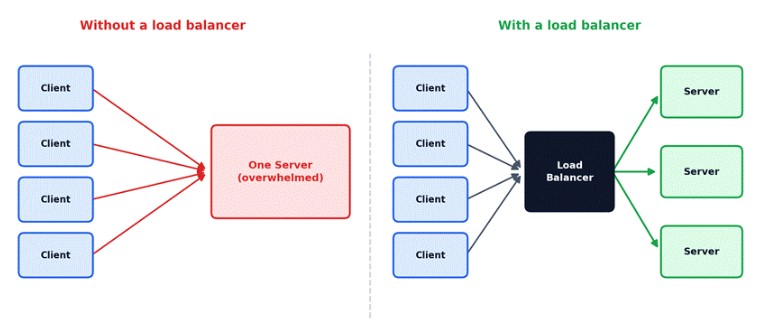
Figure 1 – Same clients, same traffic. The only difference is what stands in front of the servers.
The obvious fix is more servers. But that immediately raises a question that didn’t exist before: which server does a client talk to? You could hand every client a list of addresses and let them choose, but now every client has to know about every server, notice when one dies, and update itself when you scale up. A load balancer answers that question once, in one place, so nobody else has to.
How a Load Balancer Chooses: The Algorithms
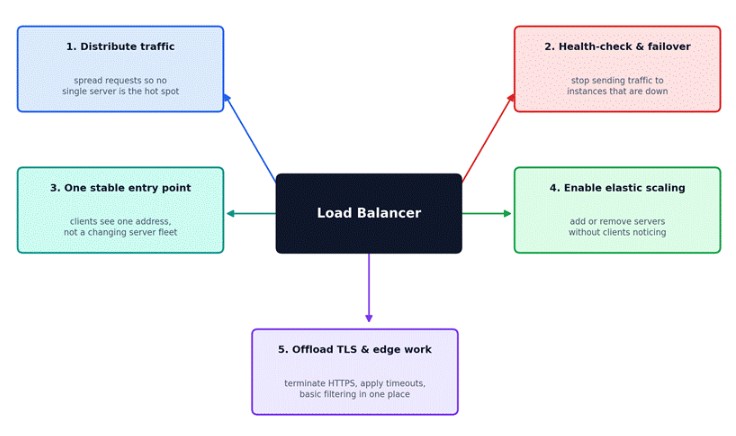
Figure 2 – “Spread the traffic” is only the first of five responsibilities.
- Distribute traffic. The headline job: spread requests across a pool of servers so no single machine becomes the hot spot while others sit idle.
- Health-check and fail over. The load balancer keeps checking whether each backend is actually alive, and quietly stops sending it traffic when it isn't. This is the job that turns “one server crashed” from an outage into a non-event.
- Provide one stable entry point. Clients talk to one address while the fleet behind it changes constantly. That decoupling is what lets you replace servers, roll out a canary to 5% of traffic, or run blue/green deployments without any client noticing.
- Make elastic scaling possible. When an autoscaler adds instances, they register with the load balancer and start taking traffic. When it removes them, the load balancer drains their in-flight requests first. Without it, scaling out would mean updating every client.
- Offload shared edge work. TLS termination, connection limits, request timeouts and basic filtering are all easier to do once at the edge than separately inside every service.
Worth Remembering
A load balancer is a performance tool and an availability tool at the same time. Teams usually add one for the first reason and discover the second one matters more – the day a server dies and nobody pages anyone.
How a Load Balancer Chooses: The Algorithms
Once there’s a pool of healthy servers, the load balancer needs a rule for picking one. The simplest rules are surprisingly effective, and the interesting question is mostly about when the simple rule stops being good enough.
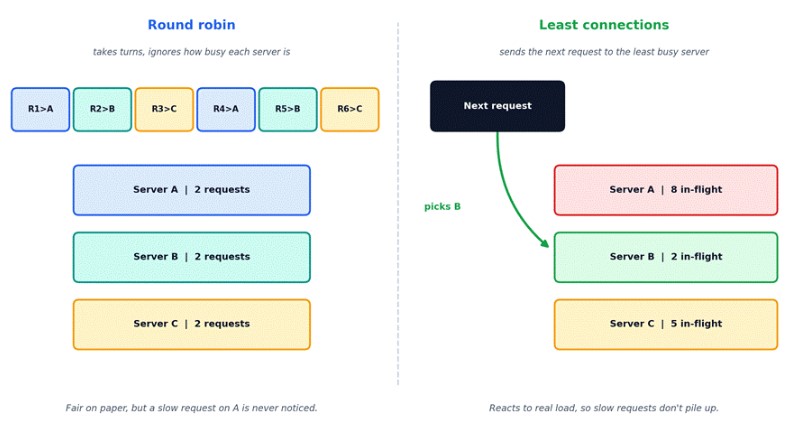
Figure 3 – Round robin takes turns; least connections reacts to how busy each server actually is.
| Algorithm | How it picks | Best for | Watch out for |
|---|---|---|---|
| Round robin | Next server in the list, in turn | Similar servers, short and uniform requests | Ignores how busy a server is |
| Weighted round robin | Turns proportional to a weight per server | Servers with different capacity | Weights must be kept up to date |
| Least connections | Server with the fewest active connections | Uneven or long-running requests | Connection count isn't the same as work per request |
| IP hash / consistent hashing | Hashes the client IP or a key | Affinity and cache locality | Uneven spread; consistent hashing limits reshuffling when the pool changes |
| Least response time | Lowest latency plus few connections | Backends that vary in speed | Needs good measurement; signals can be noisy |
In practice you rarely implement this yourself; you configure it. Here’s what a small NGINX setup looks like – least-connections balancing, one beefier server, and a spare that only receives traffic when the others are unavailable:
upstream api_pool {

    least_conn;

    server 10.0.1.11:8080 weight=3 max_fails=3 fail_timeout=30s;

    server 10.0.1.12:8080 max_fails=3 fail_timeout=30s;

    server 10.0.1.13:8080 backup;

}

server {

    listen 80;

    location /api/ {
Note the max_fails and fail_timeout settings: after three failed attempts, NGINX treats that server as unavailable for thirty seconds. That’s a passive health check – the load balancer learning from real traffic rather than from probes.
Picking One in Practice
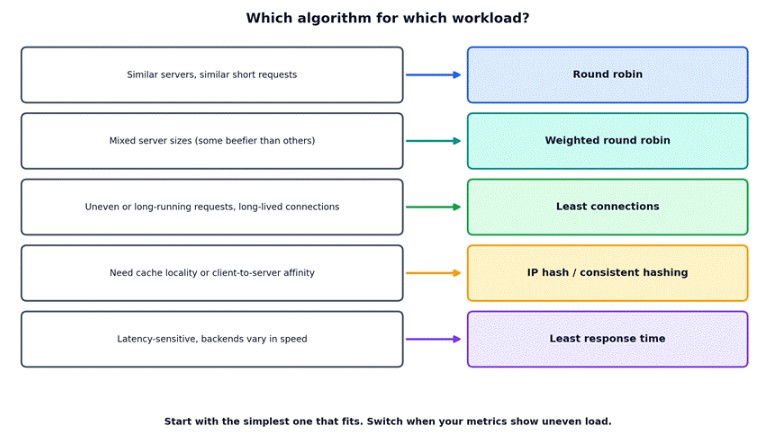
Figure 4 – Match the algorithm to the shape of your workload, not to what sounds most sophisticated.
Round robin is a perfectly good default, and plenty of production systems never leave it. Reach for least connections when request durations vary a lot, and for hashing only when you genuinely need the same client to land on the same server – which, as the Stateless vs. Stateful post in this series argues, is usually a sign that state has leaked into your servers.
Layer 4 vs. Layer 7: How Much Does the Load Balancer Understand?
Load balancers differ in how deeply they look at traffic. A Layer 4 balancer works at the transport level: it sees IP addresses and ports, and forwards TCP or UDP connections without reading what’s inside. A Layer 7 balancer understands the application protocol, so it can see the HTTP path, host, headers and cookies.
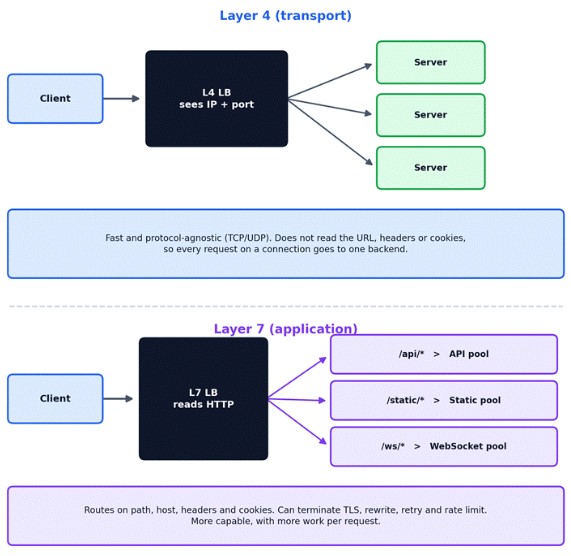
Figure 5 – A Layer 4 balancer routes connections; a Layer 7 balancer routes requests.
- Layer 4 is the right choice when you need raw speed, non-HTTP protocols, or a simple front door that spreads connections across a fleet of proxies.
- Layer 7 is the right choice when routing depends on the content of the request - sending /api to one pool and /static to another, splitting traffic for a canary release, or terminating TLS and enforcing per-route rules.
Cloud providers make the same split. On AWS, for example, the Network Load Balancer operates at Layer 4 and the Application Load Balancer at Layer 7, and other clouds offer equivalent pairs.
The Long-Lived Connection Trap
HTTP/2 and gRPC multiplex many requests over a single long-lived connection. A Layer 4 balancer picks a backend once per connection, so one busy client can pin all of its traffic to a single server while the rest of the pool idles. If you move to gRPC and your load suddenly looks lopsided, this is the first thing to check. The fixes are a Layer 7 balancer that balances individual requests, or client-side balancing.
Health Checks: How a Load Balancer Knows a Server Is Dead
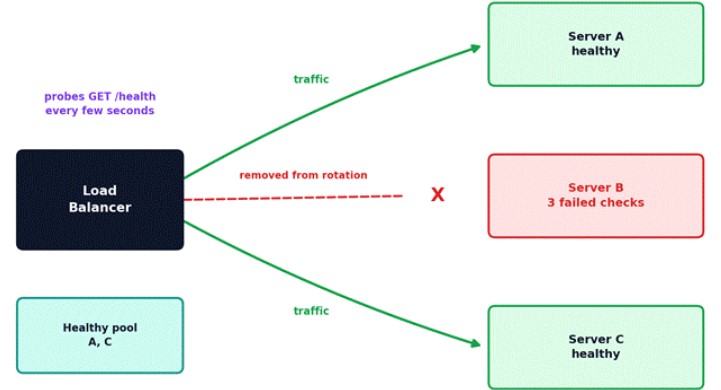
Active checks: the LB probes on a schedule. Passive checks: the LB watches real traffic for errors and timeouts.
Figure 6 – After repeated failed checks, the unhealthy server is removed from rotation until it recovers.
There are two complementary ways a load balancer learns that a backend is unhealthy:
- Active checks: the load balancer probes each backend on a schedule, usually an HTTP request to a health endpoint, and expects a quick success response.
- Passive checks: the load balancer watches real traffic and marks a backend unhealthy after enough errors or timeouts.
Most setups use both, and both need thresholds – typically a few consecutive failures to mark a server down and a few successes to bring it back – so that a single dropped probe doesn’t make a healthy server flap in and out of the pool.
Two Ways Health Checks Go Wrong
- The check that's too shallow. An endpoint that returns 200 as long as the process is running will keep reporting healthy while the server can't reach its database. The load balancer keeps sending it traffic that will fail.
- The check that's too deep. Make the health endpoint query the database, and a brief database hiccup makes every server fail its check at once. The load balancer then removes the entire pool, turning a partial degradation into a total outage.
A pragmatic middle ground is to keep the load-balancer check cheap and local, and to separate “is this process alive” from “is it ready to take traffic.” Orchestrators such as Kubernetes formalize exactly that split with liveness and readiness probes.
But Isn't the Load Balancer a Single Point of Failure?
Yes – if you deploy exactly one. This is the objection every interviewer eventually raises, and the answer is that the load balancer needs the same redundancy it provides to everyone else.
- Active-passive pairs. Two load balancers share a floating IP address. A standby watch the active one via heartbeats and takes over the address if it stops responding. Tools like keepalived implement this pattern.
- Active-active fleets. Several load balancers all serve traffic, spread via DNS or anycast routing, so there's no single box to lose.
- Managed cloud load balancers. Cloud providers run the load balancer as a distributed service across multiple availability zones, so the redundancy is their problem, not yours.
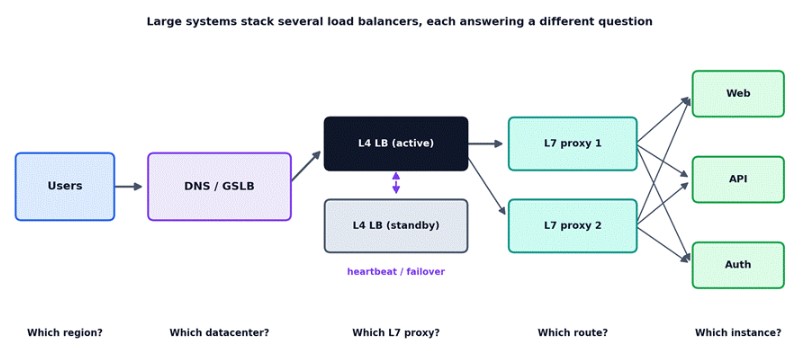
Figure 7 – Large systems stack several load balancers, each answering a different question.
The Pattern Is Recursive
Any component that fans traffic out to many things becomes a single point of failure itself, and so needs its own redundancy. Load balancers don’t remove that problem – they push it to a layer that is much smaller, simpler and easier to make highly available than your application fleet.
Where the Load Balancer Lives
“Load balancer” doesn’t always mean a dedicated box in front of your servers. The same job can be done in three different places, and modern systems often mix them.
| Placement | Examples | Strength | Trade-off |
|---|---|---|---|
| Dedicated, server-side | NGINX, HAProxy, cloud load balancers | Simple mental model; clients stay thin | An extra network hop; needs its own redundancy |
| Client-side | gRPC client balancing, Spring Cloud LoadBalancer | No extra hop; pairs naturally with service discovery | Every client needs the logic and an up-to-date server list |
| Sidecar / service mesh | Envoy proxies in a mesh such as Istio | Consistent behavior for every service-to-service call | Operational complexity and per-pod overhead |
The client-side model is worth noticing because it connects directly to the next problem in a microservice architecture: if clients pick the server, they first have to know which servers exist. That’s the job of service discovery, which is how the load balancer’s pool stays accurate when instances come and go every few minutes.
Pitfalls That Bite in Production
- Sticky sessions hiding a state problem. Pinning users to one server makes sessions work, but it undermines even distribution and failover. Treat it as a stopgap and move the state out of the server.
- Timeout mismatches. If a backend closes idle keep-alive connections sooner than the load balancer's idle timeout, the load balancer can reuse a connection the backend already closed and return intermittent 502 errors. The backend's keep-alive timeout should be longer than the load balancer's.
- Retry storms. When backends are struggling, retries from the load balancer and from clients multiply the load on exactly the servers least able to handle it. Bound retries, add backoff, and don't retry non-idempotent requests blindly.
- Losing the client IP. Behind a proxy, your servers see the load balancer's address. Preserve the original with the X-Forwarded-For header or the PROXY protocol before you build logging, rate limiting or geo logic on top of it.
- Deploying without connection draining. Removing a server mid-request drops in-flight work. Let the load balancer stop sending new requests and wait for existing ones to finish before the instance goes away.
- Hammering cold instances. A freshly started instance has cold caches and an unwarmed runtime, yet a least-connections balancer sees it as idle and floods it. Many load balancers offer a slow-start setting that ramps traffic up gradually; use it.
The Interview Question You Should Actually Prepare For
If an interviewer asks, “Why do we need a load balancer, and isn’t it a single point of failure?” don’t stop at “it distributes traffic.”
A Stronger Answer
“A load balancer gives clients a single stable address in front of a changing pool of servers. It spreads load, health-checks backends and removes failed ones from rotation, and lets us scale or deploy without clients noticing. It can itself become a single point of failure, so we run it redundantly – an active-passive pair with a floating IP, an active-active fleet behind DNS or anycast, or a managed multi-zone service – and we often layer several of them, each answering a different routing question.”
Expect the follow-ups: Layer 4 versus Layer 7, which algorithm you’d pick and why, and what happens to in-flight requests during a deploy. If you can answer those from the sections above, you’re well covered.
The Big Picture
Think of a supermarket on a busy Saturday. With a single till, everyone queues at one counter and one broken scanner stops the whole store. Open more tills and you’ve created a new problem: customers have to guess which line is shortest, and half of them guess wrong. The fix isn’t more tills. It’s a person at the front who looks at all of the lines, points each customer to the best one, and quietly closes a till the moment it breaks.
That person doesn’t scan a single item. They’re the least visible part of the store and the reason it keeps running.
A load balancer doesn’t make your system faster. It makes the number of servers behind it a decision you can change without anyone noticing.
That’s why it appears in every distributed system. The moment you have more than one server, you need something that decides which one gets each request, notices when one disappears, and keeps clients from caring. Everything else – scaling, deploys, failover – is built on top of that one capability.
Want to build the skills to design scalable, reliable systems with confidence? Get in touch with our team to explore practical learning paths in system design and DevOps that fit your career goals.