90% of DSA interview questions involve strings - directly or indirectly.
From storing a name to parsing a URL to cracking interview questions — strings are one of the most-used data structures in DSA.
In this blog, you will learn:
- What strings actually are (at the memory level)
- How Java handles strings differently from other languages
- Must-know string methods with real code
- Time and space complexity of common string operations
- Real-world use cases and interview patterns
Think About It This Way
You sign up on a new website.
You type your name: Alice.
Now, behind the scenes:
- The app reads your input character by character
- It validates the format (no numbers, no symbols)
- It checks whether that username already exists in the database
- It stores it securely after transformation
Every single one of those steps involves string operations.
And yet most beginners treat strings as just “words in quotes”.
Understanding strings properly is what separates a beginner from a problem-solver.
What is a String?
A String is a sequence of characters stored in memory.
In Java:
Behind the scenes, Java stores this as an array of characters:
Each character has an index, just like an array:
Index | 0 | 1 | 2 | 3 |
Character | R | i | y | a |
String length = number of characters = 4.
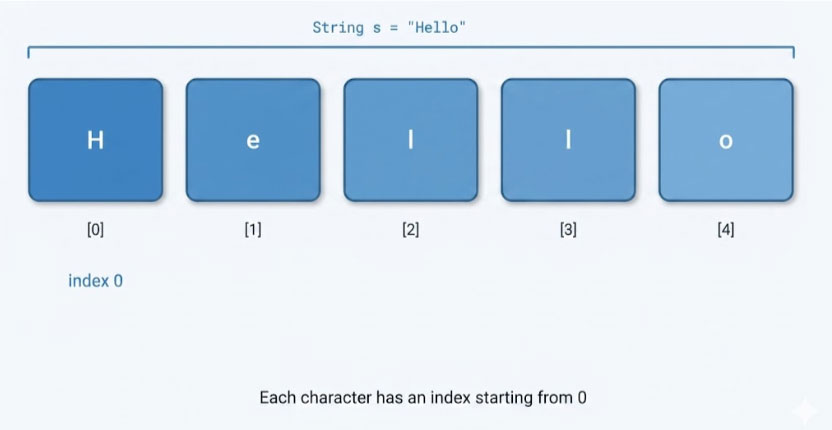
Fig 1: A string stored as a character array — each character accessible by its index
Strings Are Immutable in Java
Immutable means: once a string is created, it cannot be changed.
Look at this code:
String s = “Hello”;
s = s + ” World”;
System.out.println(s); // Hello World
Java actually created a brand new string “Hello World” in memory and pointed s to it.
The original “Hello” still exists in the String Pool until garbage collected.
Why does immutability matter?
If you concatenate strings inside a loop, Java creates a new object every iteration.
For n iterations → O(n²) time. That is a hidden performance trap.
Looks like we changed – but we didn’t.
Solution: Use StringBuilder. It is mutable and much faster.
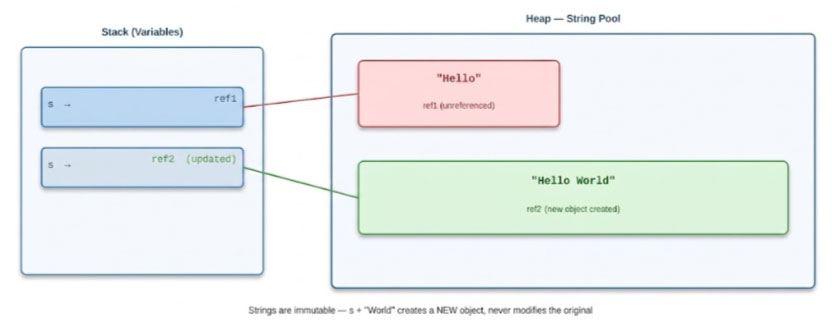
Fig 2: Java String immutability — s + ” World” creates a new object; the original stays unchanged
String vs StringBuilder vs StringBuffer
| Feature | String | StringBuilder | StringBuffer |
| Mutable? | No | Yes | Yes |
| Thread Safe? | Yes | No | Yes |
| Performance | Slow (in loops) | Fast | Moderate |
| Use Case | Fixed text | Single-thread concat | Multi-thread concat |
Golden Rule:
- Fixed text → String
- Building text in a loop → StringBuilder
- Shared across threads → StringBuffer
Most Important String Methods
Here are the methods every DSA student must know:
1. length()
Returns the number of characters in the string.
String s = “Hello”;
System.out.println(s.length()); // 5
Time Complexity: O(1)
2. charAt(index)
Returns the character at a given index.
String s = “Hello”;
System.out.println(s.charAt(1)); // e
Time Complexity: O(1)
3. substring(start, end)
Extracts a portion of the string. End index is exclusive.
String s = “Hello World”;
System.out.println(s.substring(6, 11)); // World
Time Complexity: O(n) — creates a new string
4. indexOf(char/string)
Finds the first occurrence of a character or substring.
String s = “Hello”;
System.out.println(s.indexOf(“l”)); // 2
Time Complexity: O(n)
5. equals() vs ==
This is a classic mistake beginners make.
String a = new String(“Hello”);
String b = new String(“Hello”);
System.out.println(a == b); // false (different objects)
System.out.println(a.equals(b)); // true (same content)
Always use .equals() to compare string content in Java.
== compares references (memory addresses), not values.
6. toCharArray()
Converts a string to a character array — very useful in DSA problems.
String s = “Hello”;
char[] arr = s.toCharArray();
// arr = [‘H’, ‘e’, ‘l’, ‘l’, ‘o’]
Time Complexity: O(n)
7. replace() and trim()
replace(): replaces occurrences of a character or substring.
trim(): removes leading and trailing whitespace.
String s = ” Hello World “;
System.out.println(s.trim()); // “Hello World”
System.out.println(s.replace(“World”, “Java”)); // ” Hello Java “
Time Complexity of String Operations
Operation | Method | Time Complexity |
Access character | charAt(i) | O(1) |
Get length | length() | O(1) |
Compare strings | equals() | O(n) |
Find character | indexOf() | O(n) |
Extract part | substring() | O(n) |
Convert to array | toCharArray() | O(n) |
Concatenate (String) | s1 + s2 | O(n) |
Append (StringBuilder) | .append() | O(1) amortized |
Common DSA Patterns with Strings
Most string problems fall into a few core patterns. While there are many advanced techniques, mastering these three will help you solve a majority of interview questions.
Pattern 1: Two Pointer Technique
Used to reverse a string, check palindromes, or compare from both ends simultaneously.
Example: Check if a string is a palindrome
boolean isPalindrome(String s) {
int left = 0, right = s.length() – 1;
while (left < right) {
if (s.charAt(left) != s.charAt(right)) return false;
left++;
right–;
}
return true;
}
Time Complexity: O(n) | Space Complexity: O(1)
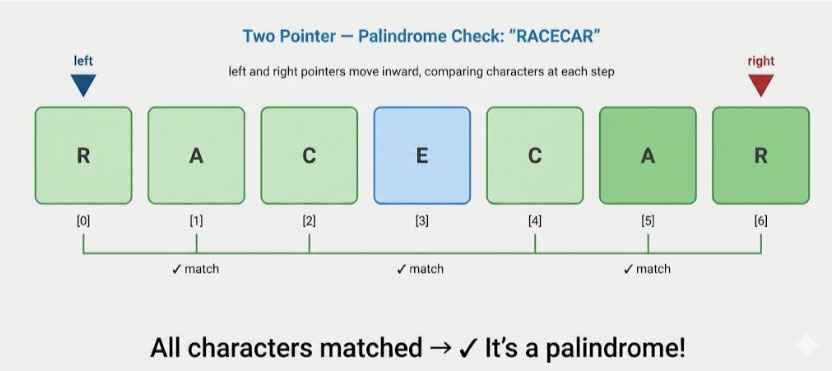
Fig 3: Two Pointer technique — left and right pointers move inward comparing characters
Pattern 2: Frequency Map using Array
Time Complexity: O(n) | Space Complexity: O(1)
Example: Check if two strings are anagrams
boolean isAnagram(String s, String t) {
if (s.length() != t.length()) return false;
int[] freq = new int[26];
for (char c : s.toCharArray()) freq[c – ‘a’]++;
for (char c : t.toCharArray()) freq[c – ‘a’]–;
for (int count : freq) {
if (count != 0) return false;
}
return true;
}
Time Complexity: O(n) | Space Complexity: O(1) — fixed array of 26
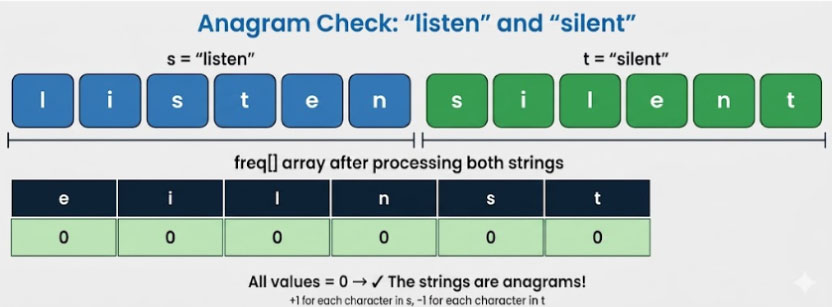
Fig 5: Frequency Map anagram check — all counts reach zero when strings are anagrams
Pattern 3: Sliding Window
Used for substring problems like longest substring without repeating characters.
int lengthOfLongestSubstring(String s) {
Set<Character> set = new HashSet<>();
int left = 0, maxLen = 0;
for (int right = 0; right < s.length(); right++) {
while (set.contains(s.charAt(right))) {
set.remove(s.charAt(left++));
}
set.add(s.charAt(right));
maxLen = Math.max(maxLen, right – left + 1);
}
return maxLen;
}
Time Complexity: O(n) | Space Complexity: O(n)
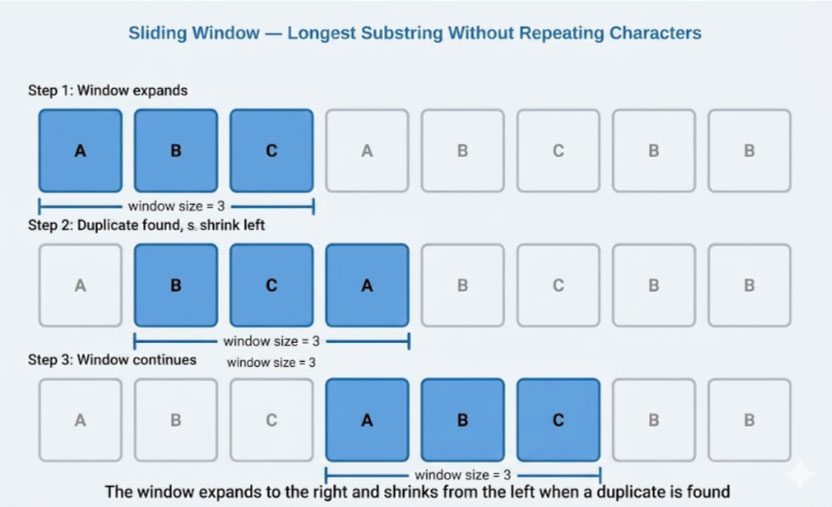
Fig 4: Sliding Window — expands right, shrinks left when a duplicate character is found
Real-World Use Cases
Strings appear in almost every software system:
1. Input Validation
Checking if an email address is in the correct format. Verifying that a password meets the required criteria.
2. Search Engines
Autocomplete and search suggestions rely on fast string matching and prefix lookups using data structures like tries.
3. Compilers and Interpreters
Every programming language parser tokenizes your source code – which is a string – into meaningful pieces.
4. Data Processing
Parsing CSV files, JSON data, and log files all involve string manipulation at scale.
5. Bioinformatics
DNA sequences are strings. Finding gene patterns is literally a string-matching problem.
Common Mistakes Beginners Make
1. Using == instead of .equals()
As covered earlier, == compares object references. This leads to bugs that are very hard to trace.
2. Concatenating strings in a loop
This creates O(n²) time complexity. Always use StringBuilder in loops.
// Bad
String result = “”;
for (int i = 0; i < n; i++) result += arr[i];
// Good
StringBuilder sb = new StringBuilder();
for (int i = 0; i < n; i++) sb.append(arr[i]);
String result = sb.toString();
3. Forgetting strings are zero-indexed
charAt(0) gives the first character. charAt(s.length() – 1) gives the last. Off-by-one errors are very common.
4. Ignoring case sensitivity
“Hello” and “hello” are different strings. Use .toLowerCase() or .equalsIgnoreCase() when case should not matter.
Frequently Asked Questions (FAQ)
Not directly. A String is an object in Java that internally uses a char array. You cannot access its elements with [], but you can use charAt() or toCharArray().
Java maintains a memory area called the String Pool (inside the heap) to store string literals. When you write String s = “Hello”, Java checks if “Hello” already exists in the pool before creating a new one.
The easiest way is to use StringBuilder:
String reversed = new StringBuilder(“Hello”).reverse().toString();
Yes. Because strings are immutable, they are inherently thread safe. Multiple threads can share the same string without synchronization issues.
Theoretically, Integer.MAX_VALUE characters (about 2 billion). In practice, you will run out of heap memory before reaching that.
A Simple Rule to Remember
When you think of a string — think of a character array with superpowers.
Master these three things and string problems become straightforward:
- Indexing and traversal - charAt(), length(), toCharArray()
- Building strings efficiently - StringBuilder over + in loops
- Recognizing patterns - Two pointer, sliding window, frequency map
Final Thoughts
Strings are not just a data type.
They are a window into how computers store and process language.
From validating a user’s input to searching billions of documents – strings are at the core of it all.
Once you understand immutability, character arrays, and the right methods to use, you will stop dreading string problems in interviews.
You will start seeing them as what they truly are:
One of the most elegant and powerful structures in all of DSA.